

Validation
JS Validation
Section titled “JS Validation”You can specify the validation rules required on each column. Possible options are mentioned below
$col["editrules"] = array("required"=>true);$col["editrules"] = array("number"=>true);$col["editrules"] = array("email"=>true);$col["editrules"] = array("date"=>true);$col["editrules"] = array("minValue"=>5, "maxValue"=>10);$col["editrules"] = array("url"=>true);The date validation will check input against format specified in datefmt option.
It uses a PHP-like date formatting. Currently “/”, “-”, and “.” are supported as date separators. Valid formats are:
y,Y,yyyy for four digits year
YY, yy for two digits year
m,mm for months
d,dd for days
$col["datefmt"] = "Y-m-d";Custom JS Validation
Section titled “Custom JS Validation”For custom validation function (be it ajax remote checking or complex regex), Follow following steps. For e.g. to check certain column value must be greater than 100:
Step1: Define custom_func property for JS function
$col = array();$col["title"] = "Date";$col["name"] = "invdate";$col["width"] = "50";$col["editable"] = true;$col["editrules"] = array("custom"=>true,"custom_func"=>"function(val,label){return my_validation(val,label);}");$cols[] = $col;Step2: Define JS callback function
<script>function my_validation(value,label){ if (value > 100) return [true,""]; else return [false,label+": Should be greater than 100"];}</script>To validate some field ‘onblur’ JS event, set it in ‘editoptions’ and define JS callback function like above.
$col["editoptions"] = array("onblur"=>"validate_onblur(this)");To run a custom code before submit, use beforeSubmit with add_options or edit_options for add/edit dialog.
Callback function will receive the posted data. e.g. for add dialog:
$opt["add_options"]["beforeSubmit"] = "function(d){ console.log(d); return false; }";Resources
Section titled “Resources”See Live Demo
- You can check this demo in archive
demos/editing/js-validation.php
Server Validation
Section titled “Server Validation”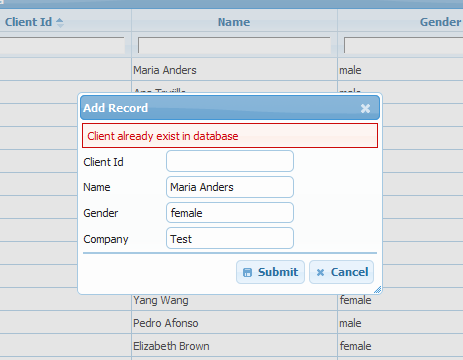
If you want to validate that client does not already exist in database. Following code will prompt the ‘already exist’ message as data entry error.
Step1: Define on_insert event handler ‘add_client’ for server validation.
$e["on_insert"] = array("add_client", null, true);$grid->set_events($e);Step2: The helper function ‘phpgrid_error’ will display your server side validation message as error dialog.
function add_client($data){  global $grid; // where $grid = new jqgrid(...);
  $check_sql = "SELECT count(*) as c from clients where LOWER(`name`) = '".strtolower($data["params"]["name"])."'";
  $rs = $grid->get_one($check_sql);
  if ($rs["c"] > 0)    phpgrid_error("Client already exist in database");
  $grid->execute_query("INSERT INTO clients VALUES (null,'{$data["params"]["name"]}','{$data["params"]["gender"]}','{$data["params"]["company"]}')");}
Resources
Section titled “Resources”See Live Demo
- You can check this demo in archive
demos/editing/server-validation.php