Laravel v5.0 Integration

NOTE: For more complete version, Visit Laravel 5.5 Integration Guide.

Following is the guide to integrate PHP Grid Framework with Laravel 5.

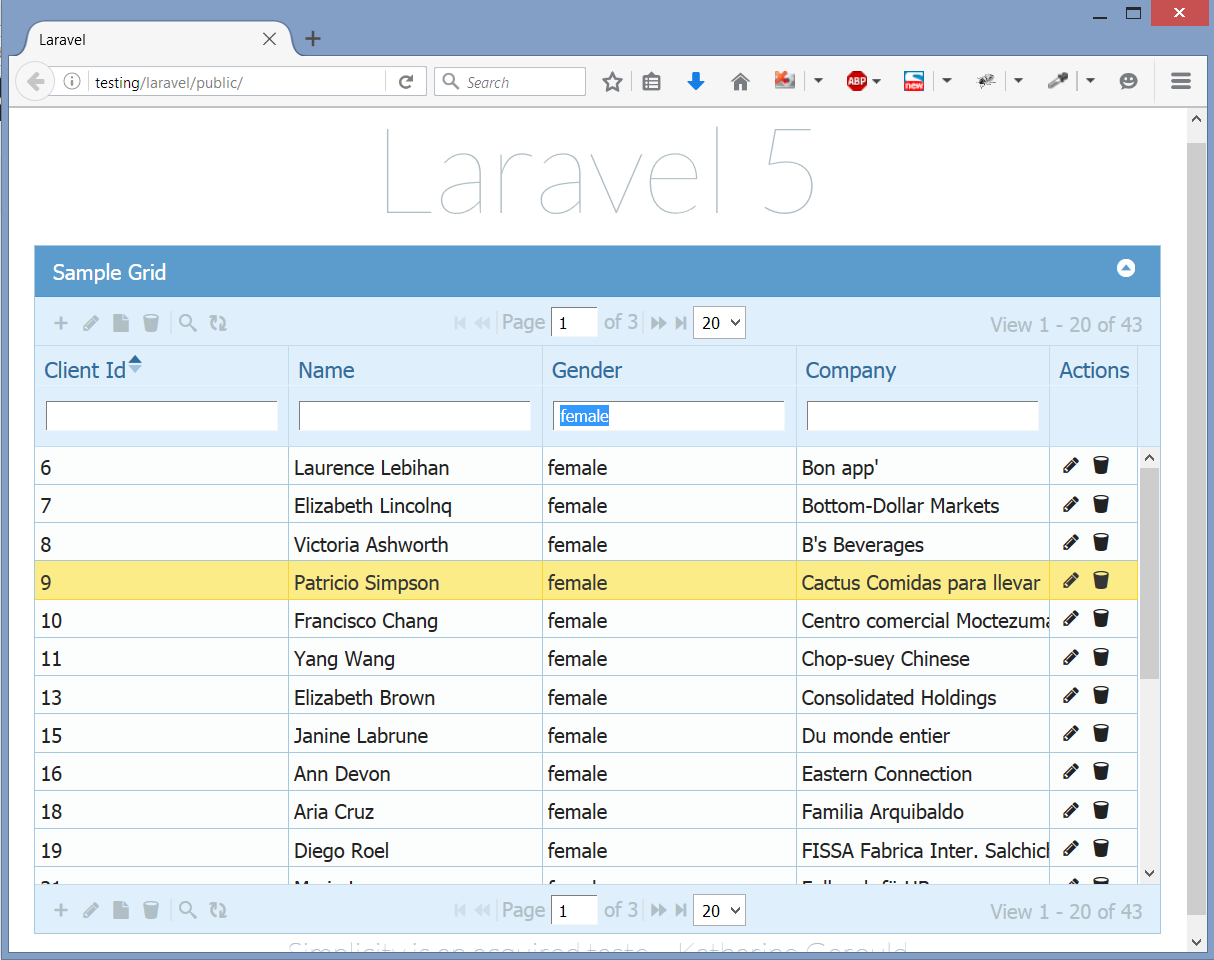
laravel_result

Step1: Folder placements in Laravel.

There are 2 main folders in PHP Grid Framework package archive. You need to:

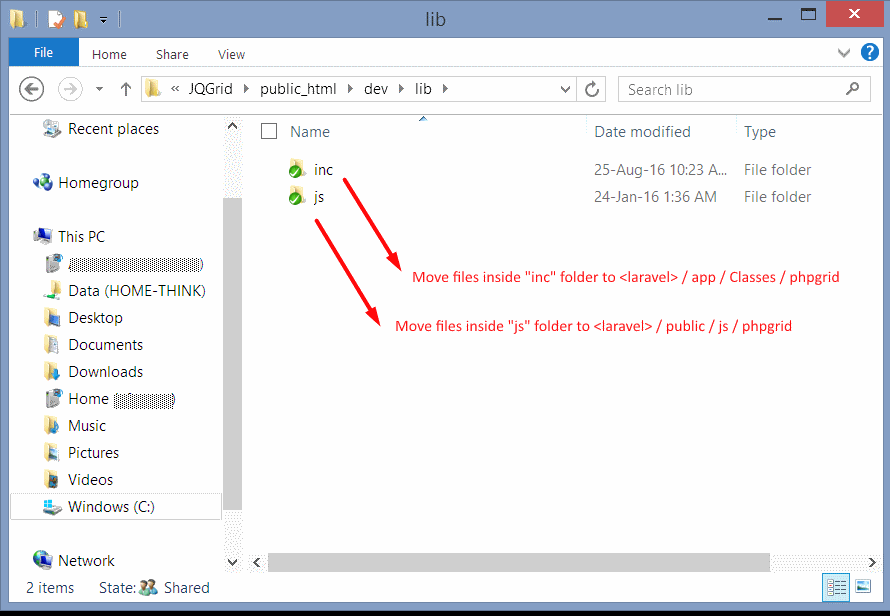
Copy the contents of lib/inc folder —> Laravel/app/Classes/phpgrid
Copy the contents of lib/js folder —> Laravel/js/phpgrid

laravel_step1_1

The ‘app/Classes’ folder does not exist by default in laravel. You may create it for 3rd party class libraries.
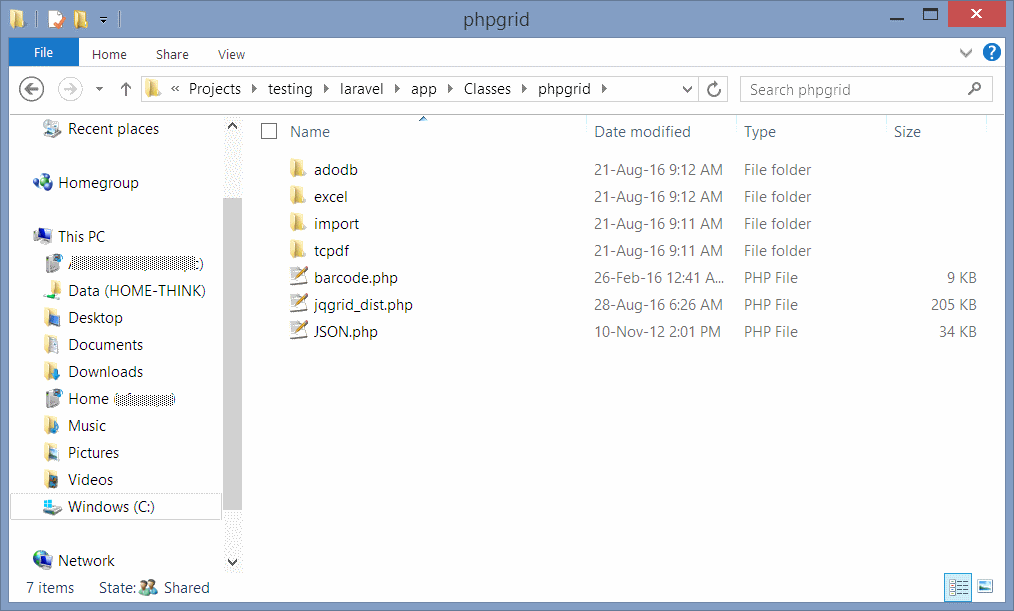
Create another folder inside it with name ‘phpgrid’ and move all contents of ‘lib/inc’ in it. Final result will look like this:

laravel_step1_2

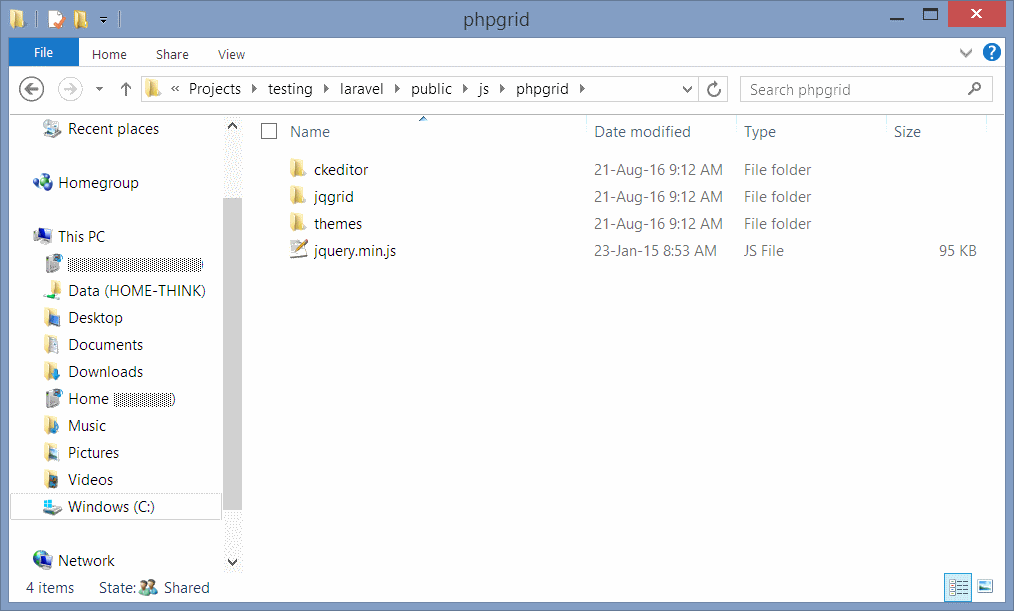
In similar way, copy the files from lib/js to laravel/public/js/phpgrid. Final result should look like following:

laravel_step1_3

Step2: Setting Controller code.

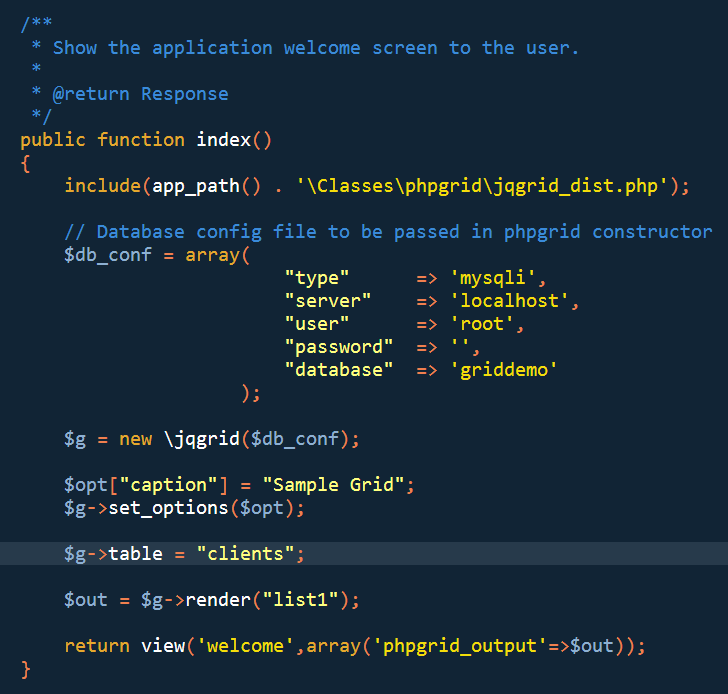
Here we included our library and rest code looks same as in our demos. Note the ‘\’ before class name while instantiating object. Finally we passed the output of render() function to view with a variable name ‘phpgrid_output’.

For demo purpose, we modified ‘laravel/app/Http/Controllers/WelcomeController.php’

laravel_step2

Step2: Setting View code.

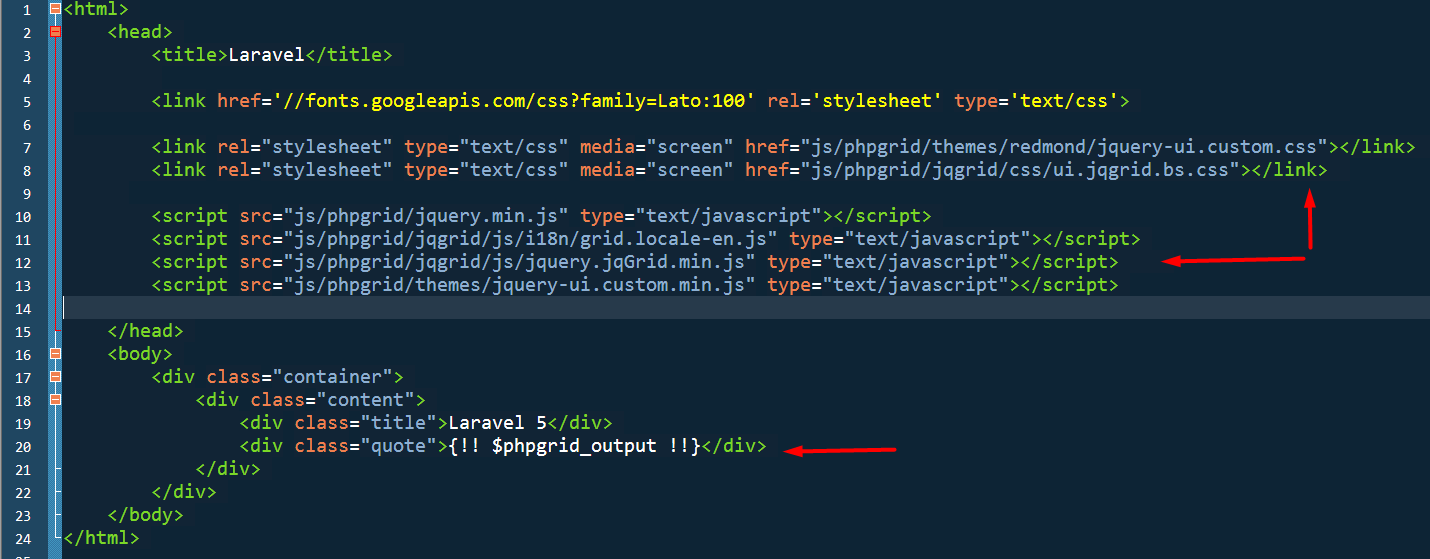
In view code, we included the JS/CSS files from the ‘js’ folder which we copied in step1.1
And using blade template variable output, we pushed the grid output in our desired place in html.
For demo purpose, we modified ‘laravel/resources/views/welcome.blade.php’

laravel_step3

Note: PHP Grid Framework does not utilize ORM model layer of Laravel. It uses it’s own backend libraries.

Result: Get Set – Go!

laravel_result

Download all files to kick-start Laravel 5 with PHP Grid Framework.

Note: Demo comes with non-commercial / evaluation version of php grid framework. You can buy commercial usage license from this link.

PHP Database Table Editor v2.0

Lightweight & Feature-Rich PHP Database Editor for SQL, MySQL, Oracle, PostgreSQL, DB2

In today’s fast-paced development environment, developers and administrators often need instant access to database tables without the overhead of writing full CRUD (Create, Read, Update, Delete) modules. Whether you work with MySQL, SQL Server, Oracle, PostgreSQL (PgSQL), or DB2, PHP Grid offers a lightweight and powerful solution. With just a few configuration steps, you can access and edit your database tables directly within your existing PHP application.

Why PHP Grid Database Editor is a Time-Saving Tool

The PHP Grid Database Editor is designed for simplicity and efficiency. Instead of building complex modules for add, edit, delete, and search operations, you can get a fully functional database grid by setting the $g->table attribute to your selected database table.

Example code:

$g = new jqgrid();

// set few parameters
$grid["caption"] = "Grid for '$tab'";
$grid["autowidth"] = true;
$g->set_options($grid);

// set database table for CRUD operations
$g->table = $tab;

// render grid
$out = $g->render("list1");

This lightweight PHP database grid can be easily extended with additional features such as:

  • Access Control (ACL)

  • Exporting data (PDF, CSV, XLS)

  • Bulk editing with multi-selection

  • Grid persistence (column resizing, filters, sorting)

The demo above is based on MySQL, but the same code works seamlessly with MS SQL Server, Oracle, PgSQL, and DB2 databases.

Key Features of PHP Grid

  • CDN-based CSS/JS files for faster page loading

  • Hide or show specific columns

  • Select tables and fields for editing at runtime

  • Bulk editing and multi-selection support

  • Grid persistence (resizing, filtering, sorting)

  • Free and licensed versions available: Connect to MySQL, SQL Server, Oracle, PgSQL, and DB2 databases, with the licensed version offering advanced integration features

Frequently Asked Questions (FAQ)

Q: What is PHP Grid?
A: PHP Grid is a lightweight PHP-based database editor that allows developers and administrators to view, edit, and manage database tables without writing full CRUD modules. It supports MySQL, SQL Server, Oracle, PostgreSQL, and DB2.

Q: Who uses PHP Grid?
A: PHP developers, database administrators, and software teams who need fast and easy database management within PHP applications use PHP Grid. It is ideal for internal admin panels, dashboards, and rapid development projects.

Q: How does PHP Grid work?
A: PHP Grid works by connecting to your database using credentials in a config file. You set the target table in the $g->table attribute, and PHP Grid generates a fully interactive table grid with add, edit, delete, and search functionality.

Q: Can PHP Grid handle multiple databases?
A: Yes! PHP Grid supports MySQL, MS SQL Server, Oracle, PostgreSQL, and DB2. The same interface works for all supported database types.

Q: Is PHP Grid free?
A: PHP Grid comes with both Free and Licensed versions. The free version allows connection to multiple databases, while the licensed version adds advanced features and integration options for enterprise-level applications.

Q: Can I export data from PHP Grid?
A: Absolutely. PHP Grid supports exporting data in PDF, CSV, and XLS formats, making it easy to share reports or backups.

Get Started with PHP Grid

You can download PHP Grid today and save hours of development time. Integrate a powerful database editor directly into your PHP applications and start managing your tables instantly.

Complete code for this demo can be accessed from this link.

You can Download and Start saving your time now!

Multiple Files Uploading

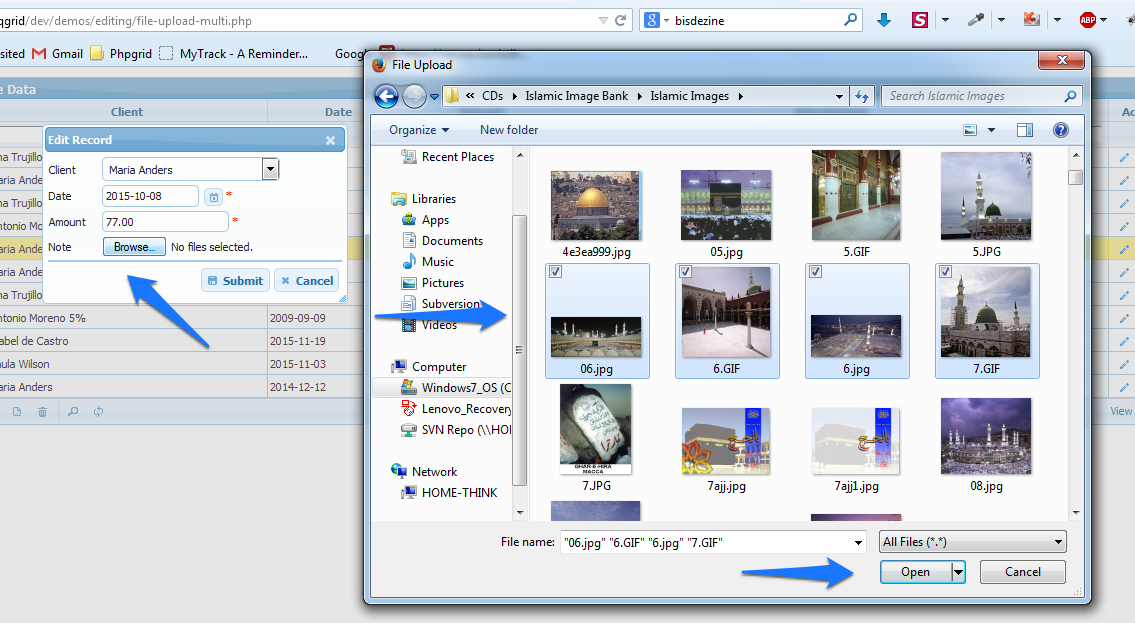
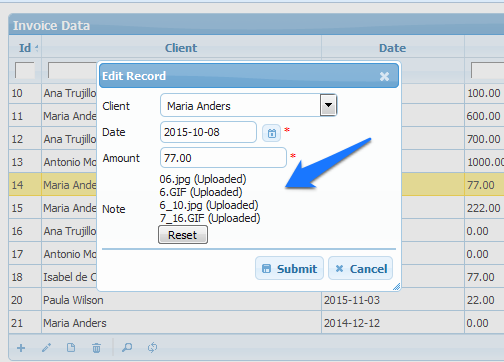
Now PHP Grid support multiple file upload option. You can multi-select the files as in screenshot and upload to server.

multi-upload-1 Files are uploaded in specified folder and file names are saved as comma separated value in file type field.


multi-upload-2

Active licensed customers can get latest build + demo which supports it.
Contact us at gridphp@gmail.com

Firebird & SQLite Database Editor Support

We recently added support for Firebird & SQLite Databases. These fast, slick and reliable databases will help in running portable apps with PHP Grid. Thanks to PDO library, it’s integration is very with little configuration changes.

sqlite370_banner

// Database config for SQLite
$db_conf = array();
$db_conf["type"] = "pdo";
$db_conf["server"] = "sqlite:../../sampledb/northwind.sqlite";
$db_conf["user"] = "";
$db_conf["password"] = "";
$db_conf["database"] = "";
$g = new jqgrid($db_conf);


firebird

// Database config for Firebird
$db_conf = array();
$db_conf["type"] = "pdo";
$db_conf["server"] = "firebird:host=localhost;dbname=C:/sampledb/employee.fdb";
$db_conf["user"] = "SYSDBA";
$db_conf["password"] = "masterkey";
$db_conf["database"] = "";
$g = new jqgrid($db_conf);

Working demo code: http://www.phpgrid.org/demo/demos/loading/db-layer-firebird.phps

You will need to change database credentials and update tables/columns configuration as desired. Refer docs for help.

Licensed customers can request free upgrade using update link.
To download free license, visit download page.
To purchase license, you can visit this link.

Search with Multiple Group Conditions

Hello,

We’ve added most robust and efficient complex searching method in PHPGrid.

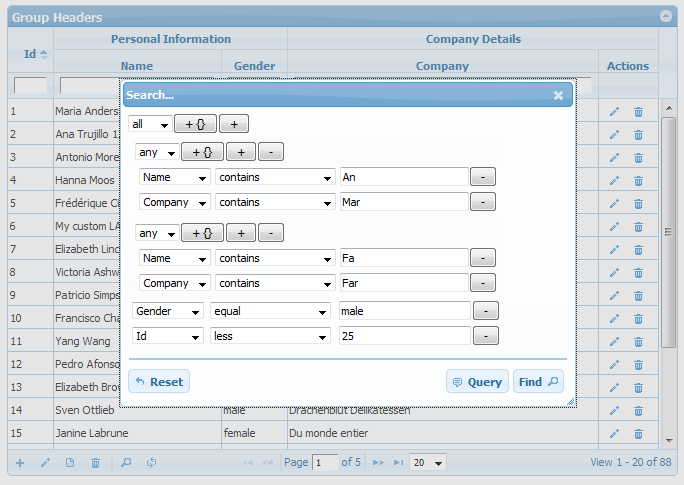
This enables the more advanced search dialog allowing to add any number of complex group conditions. The user can now add or delete an unlimited number of conditions to perform the search as shown in screenshot.

search-group

This will formulate following search query, “( … )” refers groups in search query:

(name LIKE "%An%" OR company LIKE "%Mar%") 
AND 
(name LIKE "%Fa%" OR company LIKE "%Far%") 
AND 
gender = "male" AND client_id < 25

Hope you like this feature. Customers with active subscription can get latest build + demo via email.
We also offer discounted renewal prices for customers with expired subscription.
For any case, contact on our support team at (gridphp@gmail.com).

Exporting selected Columns & Rows (at Runtime)

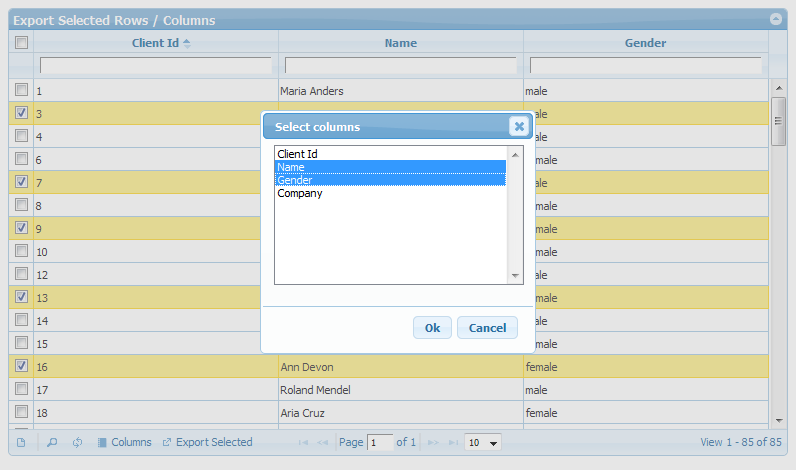
Now you can export selected rows and columns at runtime. This means no code change, Export selection options are now on accessible with grid operations toolbar.

Demo: http://phpgrid.org/demo/demos/export/export-selected.php

In demo, select columns using column chooser and rows by multiselect option, then click Export selected button. This will export PDF of selected rows/cols. As the grid exports PDF format, the data table can be printed by your favorite PDF reader.

Export selected Columns and Rows

Enhanced Autocomplete (Typeahead) Integration

We’ve further enhanced PHP Grid and JQuery UI Autocomplete integration.
Types and Steps shows how to integrate database driven type ahead / autocomplete by lookup sql query.

1) Basic Typeahead (single field)

Step1: Set formatter to autocomplete on desired column

$col["formatter"] = "autocomplete"; // autocomplete

Step2: Set format options query. The field in sql aliased ‘v’ will be shown in list

// Fill the name field with query values typeahead
$col["formatoptions"] = array(	"sql"=>"SELECT name as v FROM clients", "update_field"=>"name");

2) Autofill other field.

The field ‘company’ will be filled w.r.t. selected name.

$col["formatoptions"] = array(	"sql"=>"SELECT company as k, name as v FROM clients","update_field"=>"company");

The field aliased ‘k’ will be set in the ‘updated_field’ column (e.g. company)

3) Callback function

Connect a callback function that will auto-fill multiple fields.

$col["formatoptions"] = array(	"sql"=>"SELECT *, name as v FROM clients", "callback"=>"fill_form");

and in html part, define callback JS function.

<script>
function fill_form(data)
{
    jQuery("input[name=gender].FormElement").val(data.gender);
    jQuery("textarea[name=company].FormElement").val(data.company);

    jQuery("input[name=gender].editable").val(data.gender);
    jQuery("textarea[name=company].editable").val(data.company);
}
</script>

References: Sample Code and Live demo

Active license subscription OR those who wish to renew subscription can get updated build by contacting via email (gridphp@gmail.com).