Upgrade Spreadsheets to a Smart AI Data Tables

Upgrade Your Spreadsheet to a Database with AI-Powered DataGrid

Many developers and businesses start by managing data in Excel spreadsheets or Google Sheets. While spreadsheets are easy to use, they quickly become messy, hard to scale, and insecure when shared. If you’ve ever struggled with broken formulas, version conflicts, or slow performance, it’s time to upgrade your spreadsheet to a real database.

That’s where GridPHP comes in — turning your spreadsheet-like workflow into a powerful PHP MySQL database editor. You get the flexibility of a spreadsheet, combined with the security, scalability, and performance of a relational database.

Why Move Beyond Spreadsheets?

  • 📉 Spreadsheets don’t scale: Large data sets become slow and error-prone.
  • ⚠️ Data integrity issues: Anyone can break formulas or accidentally delete rows.
  • 🔒 Security risks: Sharing Excel files isn’t safe for sensitive data.
  • 🤝 Collaboration limits: Difficult to manage real-time, multi-user edits.

GridPHP: Your Spreadsheet-to-Database Upgrade

With GridPHP, you can replicate the spreadsheet editing experience directly on top of a MySQL or PostgreSQL database. Developers get an instant PHP CRUD editor with features like:

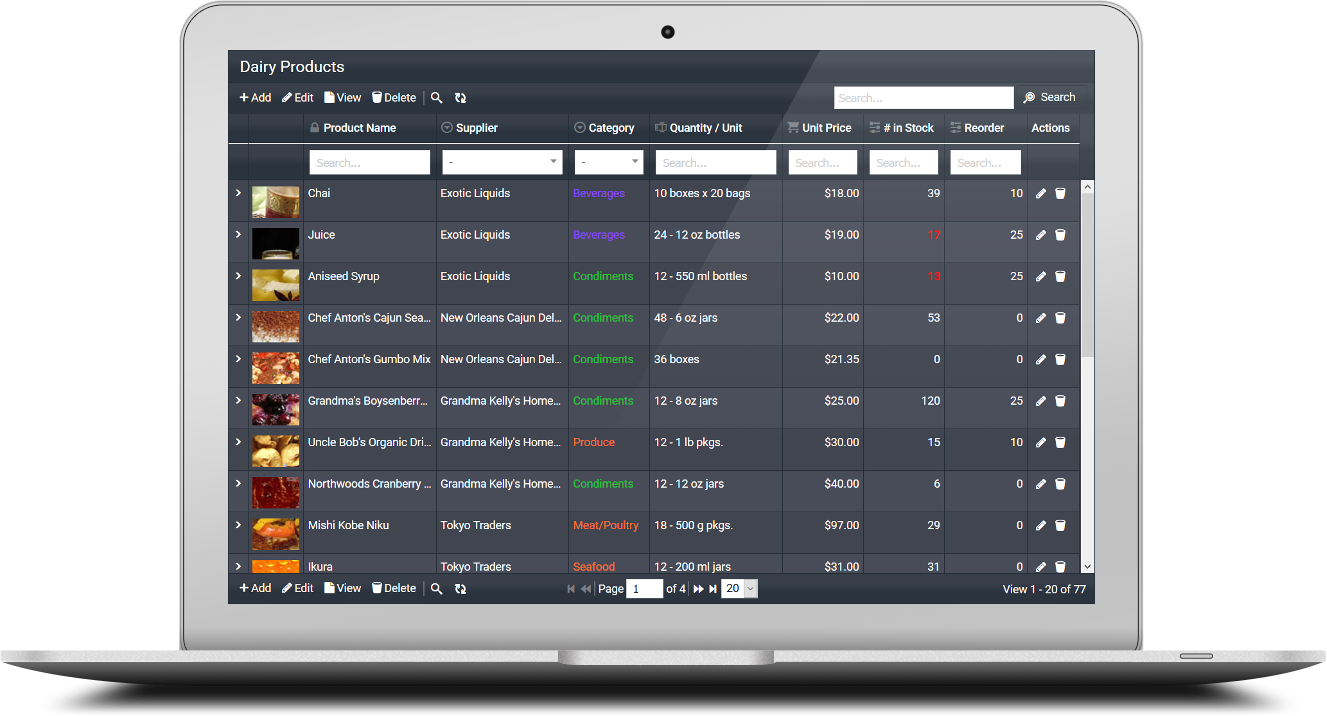
  • Editable Data Grid: Inline editing & form editing just like a spreadsheet.
  • 📊 Smart Table UI: Sorting, filtering, grouping, and pagination built-in.
  • 📥 CSV/Excel Import & Export: Migrate spreadsheets directly into your database.
  • 🎨 Modern Themes: Bootstrap 5 responsive designs for admin panels.
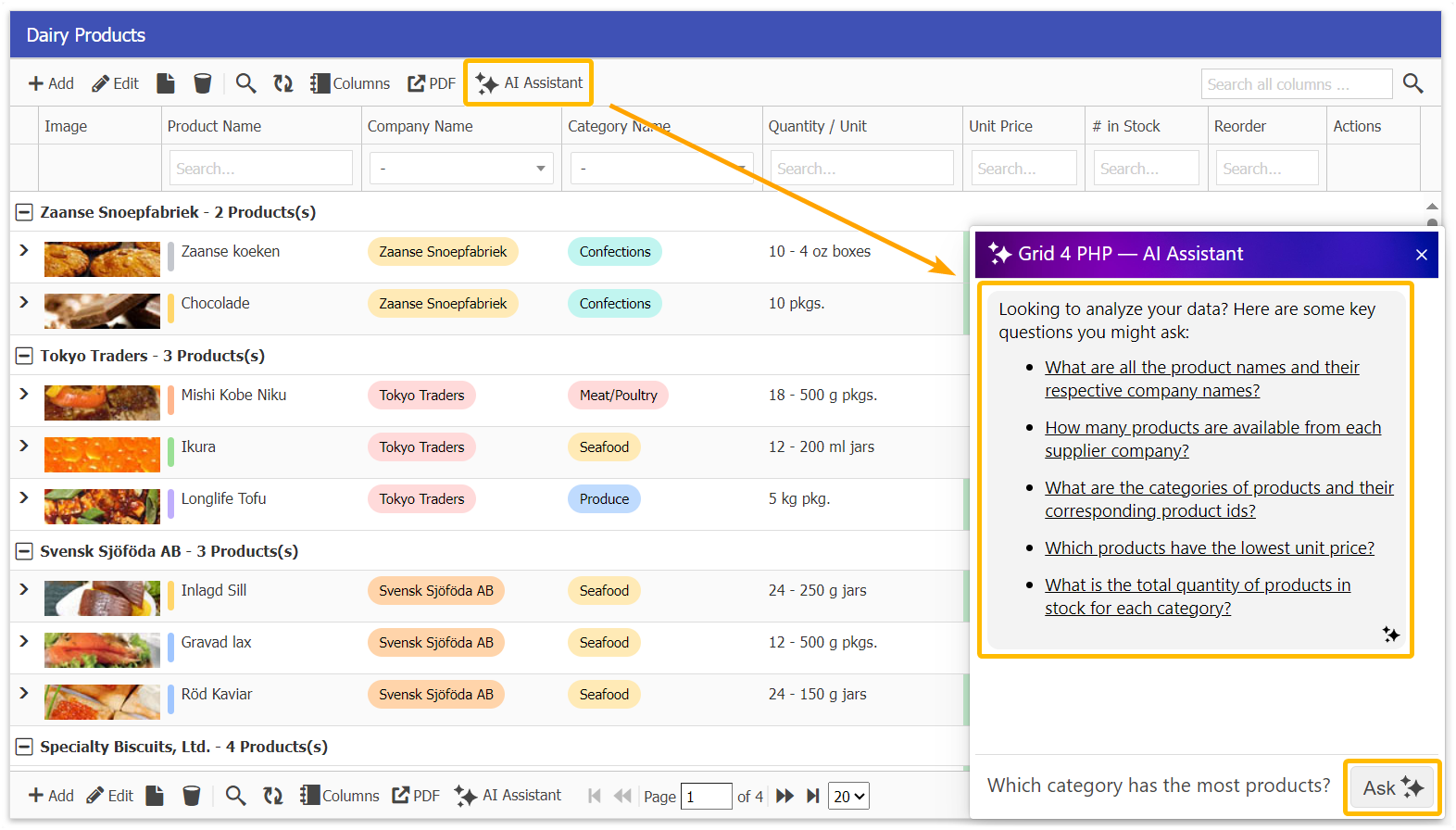
  • 🤖 AI DataGrid Assistant: Query, filter, and summarize your data in plain English.

Code Example – From Spreadsheet to Database

Here’s how simple it is to turn your MySQL table into a live, editable PHP grid:


  <?php
  include("inc/jqgrid_dist.php");

  $db_conf = array(
      "type"     => "mysqli",
      "server"   => "localhost",
      "user"     => "root",
      "password" => "",
      "database" => "mydb"
  );

  $g = new jqgrid($db_conf);
  $g->table = "inventory"; // imported spreadsheet table

  echo $g->render("list1");
  ?>
  

This single snippet gives you an editable web-based database interface that feels like a spreadsheet — but powered by MySQL.

Unique Benefits

  • ✅ Spreadsheet simplicity with database reliability.
  • ✅ Multi-user support with role-based access control.
  • ✅ Avoid data corruption and maintain integrity.
  • ✅ Rapid development — no need to code CRUD manually.

Try GridPHP Today

If you’re tired of juggling messy spreadsheets, download GridPHP and instantly upgrade your workflow to a secure, scalable database editor.
Stop fixing spreadsheets — start managing real data.

Build a PHP MySQL Editor in Minutes with AI-Powered DataGrid

PHP MySQL Editor – Fast, Secure & Browser-Based Data Management

Editing and managing MySQL data is one of the most common requirements for PHP developers. Managing MySQL data shouldn’t require clunky desktop tools or endless boilerplate code. A modern PHP MySQL Editor lets you browse, edit, and manage tables directly in the browser—ideal for admin panels, internal dashboards, and CRUD-heavy apps. With the right toolkit, you can turn raw database tables into a clean, editable interface in minutes 🚀.

Instead of coding repetitive CRUD logic manually, you can use GridPHP to instantly create a PHP MySQL Editor with sorting, filtering, pagination, and inline editing — all in just a few lines of code.

What Is a PHP MySQL Editor?

A PHP MySQL Editor is a web-based interface for creating, reading, updating, and deleting MySQL records (PHP CRUD). It behaves like a spreadsheet—inline edits, instant saves, smart filters and data validation—without writing repetitive code. Think of it as a developer-friendly layer on top of MySQL that ships with the essentials out-of-the-box.

Why Use GridPHP for PHP MySQL Editing?

  • Minimal Code: Fully functional CRUD in under 10 lines.
  • 📊 Smart Table UI: Sorting, filtering, search, and paging out of the box.
  • ✍️ Editable Grid: Inline editing and form-based editing for records.
  • 🔄 MySQL CRUD Support: Create, read, update, and delete data with built-in validation.
  • ⚡ Sorting & Pagination: Smooth navigation across large datasets.
  • Relations Support: Lookups for foreign keys, dropdowns for related tables.
  • 📂 Import/Export: Handle CSV/Excel seamlessly.
  • 🎨 Bootstrap UI: Responsive and modern look without extra effort.
  • 🤖 AI DataGrid Assistant: Ask in plain English to filter, search, or summarize your MySQL data.

Benefits Over Manual Coding

  • Speed: Ship production-ready data screens in hours, not weeks.
  • Maintainability: Centralized CRUD logic and reusable components.
  • Consistency: Uniform UX for tables, filters, and exports across modules.
  • Scalability: Server-side processing handles large tables efficiently.
  • Flexibility: Hook into events, validators, and custom actions without reinventing the wheel.

Common Use Cases

  • Admin panels for SaaS and internal tools
  • Content and catalog management (products, users, orders)
  • Operational dashboards with editable queues and statuses
  • Data cleaning and back-office editing for support teams

Code Example – PHP MySQL Editor in Action

Here’s how you can create a PHP MySQL Editor in just a few lines using GridPHP:


  <?php
  include("inc/jqgrid_dist.php");

  $db_conf = array(
      "type"     => "mysqli",
      "server"   => "localhost",
      "user"     => "root",
      "password" => "",
      "database" => "mydb"
  );

  $g = new jqgrid($db_conf);
  $g->table = "users"; // MySQL table to edit

  echo $g->render("list1");
  ?>
  

That’s it — this snippet instantly gives you a browser-based PHP MySQL Editor with CRUD, sorting, paging, and filtering enabled.

Try It Yourself

Stop wiring CRUD by hand. Spin up a PHP MySQL Editor that’s fast, secure, and easy to customize.

Download and try it free — build a production-ready MySQL editor in minutes.

PHP Editable Grid – Smart PHP CRUD Table & AI-Powered DataGrid

Managing data in PHP applications can be time-consuming. Developers often need to build features such as
CRUD (Create, Read, Update, Delete), editable PHP tables, search filters, pagination, import/export, and responsive
designs. Writing all of this from scratch takes significant effort and leads to repetitive work.

This is where GridPHP comes in 🚀 — a powerful PHP Editable Grid (PHP DataGrid) designed to simplify
PHP CRUD tables and accelerate development.

GridPHP – PHP Editable Grid & Smart CRUD Table

GridPHP makes it simple to create fully functional, interactive PHP datatables with minimal coding.
It offers everything developers need for a professional data management solution:

  • ✅ Inline and form-based editing for true PHP editable grids
  • ✅ Full CRUD support (Add, Edit, Delete, View)
  • ✅ Smart search, filtering, and sortable columns
  • ✅ AJAX-powered performance for seamless data handling ⚡
  • ✅ Import & Export options (Excel, CSV)
  • ✅ Master-detail grids and nested subgrids
  • ✅ Multiple database support (MySQL, PostgreSQL, MS SQL, Oracle, SQLite)

What makes GridPHP unique is its AI-powered PHP DataGrid assistant 🤖. Instead of writing complex queries,
developers can type natural language commands like:

  • “Show orders above $1000”
  • “List users who registered last month”

This makes data handling faster, smarter, and more intuitive.

Unique Benefits of GridPHP

  • Rapid Development: Build PHP CRUD tables in minutes.
  • Developer-Friendly: Clean API designed by developers, for developers.
  • AI-Powered DataGrid: Natural language queries without SQL.
  • Modern Design: Responsive, Bootstrap 5 ready, and customizable themes.
  • Multi-Database Connectivity: Works across major databases seamlessly.

Try GridPHP for Free

Why spend hours coding repetitive CRUD logic when you can set up a
fully functional PHP Editable Grid in just a few lines of code?

👉 Download the free version of GridPHP and experience how quickly you can build
PHP CRUD tables, smart datatables, and AI-powered datagrids.