
Load Grid from Array Data
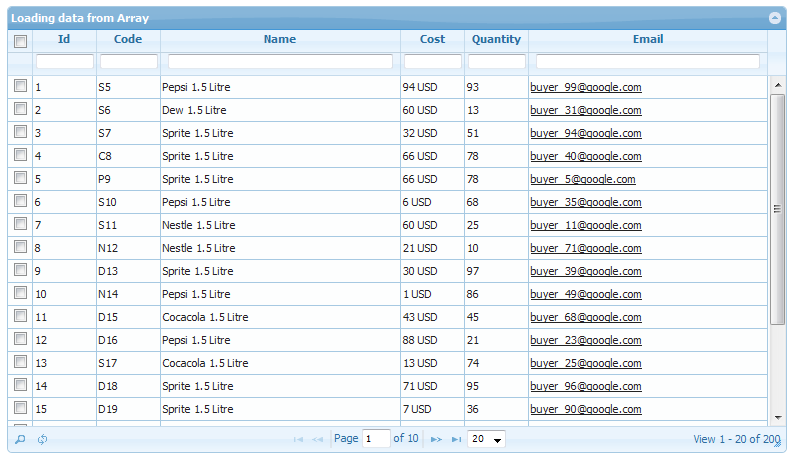
After several requests from valuable customer, i’ve added option to display php grid from php array data as input (no database connection required).
It’s usage is very simple. Suppose you have an array, then all you have to do is to pass it in table parameter. See code sample below. Do consider the format of array should be consistent as it is in example (data and colums may change).
$name = array('Pepsi 1.5 Litre', 'Sprite 1.5 Litre', 'Cocacola 1.5 Litre', 'Dew 1.5 Litre', 'Nestle 1.5 Litre');
for ($i = 0; $i < 200; $i++)
{
    $data[$i]['id']    = $i+1;
    $data[$i]['code']    = $name[rand(0, 4)][0].($i+5);
    $data[$i]['name']    = $name[rand(0, 4)];
    $data[$i]['cost']    = rand(0, 100)." USD";
    $data[$i]['quantity'] = rand(0, 100);
    $data[$i]['discontinued'] = rand(0, 1);
    $data[$i]['email'] = 'buyer_'. rand(0, 100) .'@google.com';
    $data[$i]['notes'] = '';
}

// pass data in table param for local array grid display
$g->table = $data;
This will show the grid in read only mode, and options like search, sorting and paging will be available. You can also use custom formatter to change display of data in grid, for e.g. making hyperlink or show as tag etc. Working example included in package.
FAQs Section Added
We recently added Frequently Asked Questions section, to help our developers base. To access FAQs, It’s under support menu on top right bar. If you still don’t find it (smile), here is the link.
One more update … v1.4.8 is about to release, so stay tuned.
Live Demo Revamped
Recently we revamped the live demo section of website, and now almost all of PHP Grid features are on showcase. Check it out by visiting this link.
Open Grid in Edit Mode by default
Usually behavior is grid loads in display mode and on clicking edit, it turns to editing mode of a row. Sometimes we need to open whole grid in default editing mode and do the editing without clicking edit on each row.
This example provides solution for that. See attached image for more.
Refer: Demos > Editing > Default edit

CSV export option added
Due to several requests from members, With Excel & PDF, Now you can also export your grid data as CSV, which could be an input to your other data processors.
Running PHP Grid in Debug Mode
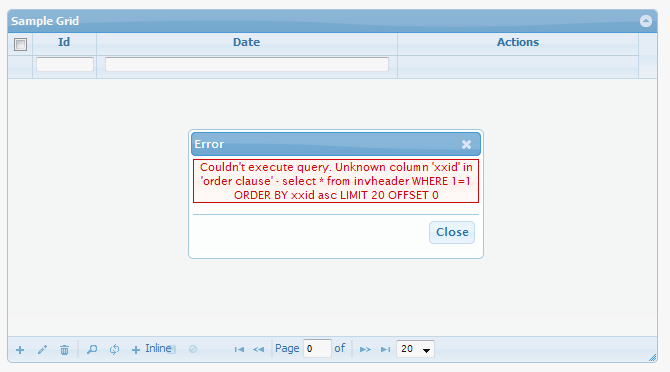
Due to any configuration issue if your server is generating errors, you can view the exact technical issue behind it by using debug mode. Debug mode is enabled by default and it will show the server side failure reason. For e.g.
When going in production mode, you should disable the debug mode by following config.
$g = new jqgrid();
$g->debug = 0;
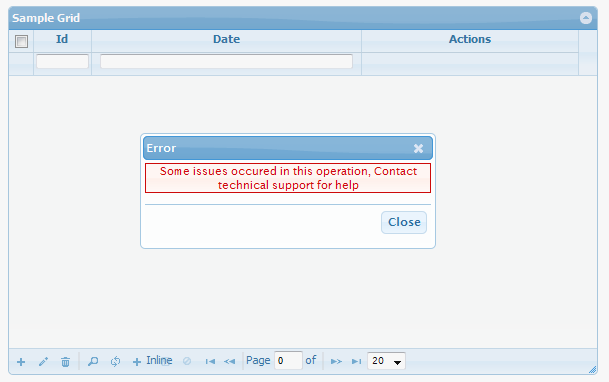
In non-debug mode if your grid generates errors for some unfortunate reason, it will be display non-technical message to contact support team.
Server-side Data Validation
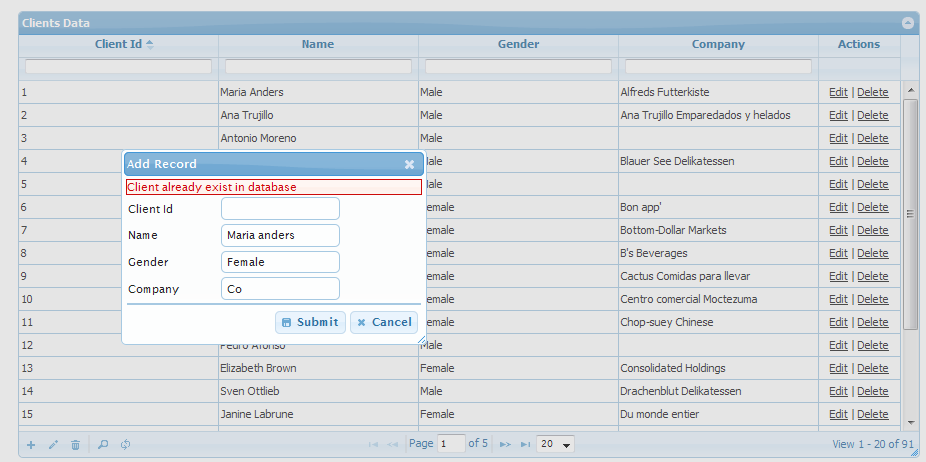
To write your own insert/update/delete implementations, we use custom events that allows us to have our custom business case coding. We’ve added another helper function that will push your server side validation error to php grid, and display it as error dialog.
For example, if you have written your on_insert function, and want to validate that client does not already exist in database, you can write this code. It will prompt the ‘already exist’ message as data entry error.
The helper function name is ‘phpgrid_error’.
function add_client($data)
{
	$check_sql = "SELECT count(*) as c from clients where LOWER(`name`) = '".strtolower($data["params"]["name"])."'";

	$rs = mysql_fetch_assoc(mysql_query($check_sql));

	if ($rs["c"] > 0)
		phpgrid_error("Client already exist in database");

	mysql_query("INSERT INTO clients VALUES (null,'{$data["params"]["name"]}','{$data["params"]["gender"]}','{$data["params"]["company"]}')");
}
It is available in latest build, so eligible premium members can claim their copy.
Custom Validation Code on Client-side
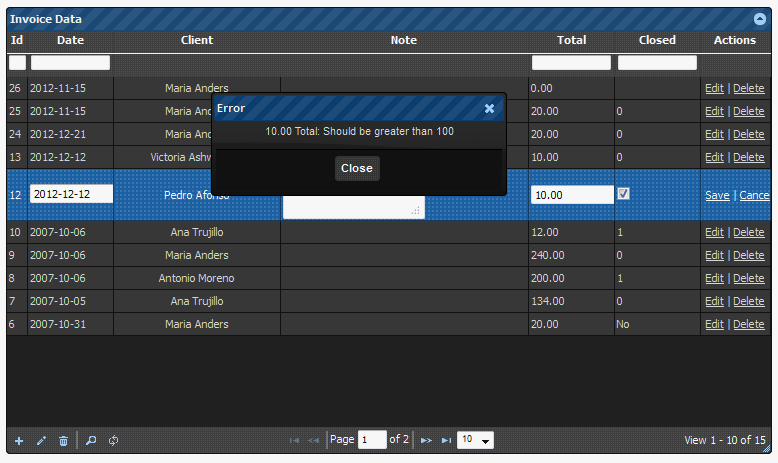
Added another example of client side custom JS validation w.r.t. particular field. Now you can write your own validation implementation (be it ajax remote checking or complex regex) on each field while adding or editing information in php grid control. For example, certain value must be greater than 100.
If you wish to have back-end PHP level validation, it is also doable using custom on_insert and on_update events.
Currently, it is packaged in premium version. To request for premium package, click here
Conditional Row Formatting
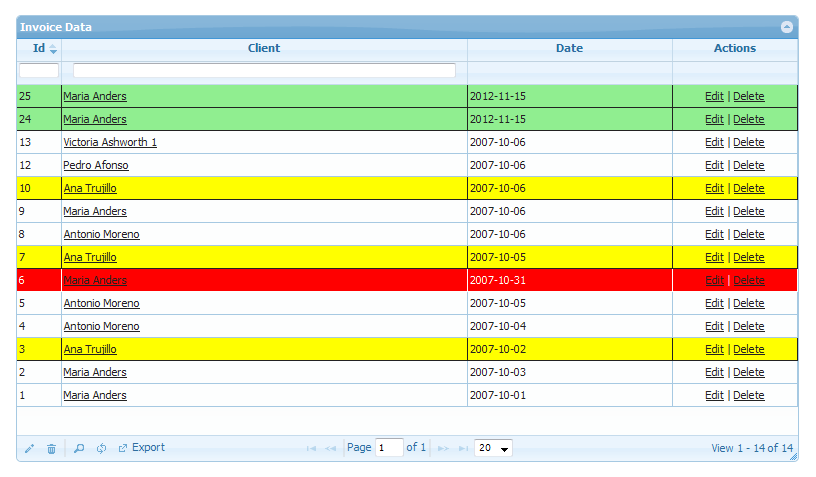
Added new demo for css formatting of rows, based on certain conditional values. You need to define column,operator(cn/eq),value and css style for the row. It will highlight your grid rows as per your need.
This feature is currently available in paid package. Existing customers can request this demo when needed.
// conditional css formatting of rows

$f = array();
$f["column"] = "name"; // exact column name, as defined above in set_columns or sql field name
$f["op"] = "cn"; // cn - contains, eq - equals
$f["value"] = "Ana";
$f["css"] = "'background-color':'yellow'"; // must use (single quote ') with css attr and value
$f_conditions[] = $f;

$f = array();
$f["column"] = "invdate";
$f["op"] = "eq";
$f["value"] = "2007-10-31";
$f["css"] = "'background-color':'red', 'color':'white'";
$f_conditions[] = $f;

$f = array();
$f["column"] = "invdate";
$f["op"] = "cn";
$f["value"] = "2012";
$f["css"] = "'background-color':'lightgreen'";
$f_conditions[] = $f;

$g->set_conditional_css($f_conditions);
Above code result in following formatting …
Released PHP Grid Control v1.4.7 (for Premium Members)
We’ve released a new premium version covering several features and bug fixes as reported by our valuable community. Keep visiting website for future updates.
Have Fun!
Change Log:
– Integration with Oracle (db-layer-oracle.php)
– Frozen column example (frozen-column.php)
– Documentation (md) file added in package
– Master-detail example (master-detail.php)
– Multiple grids on same page (multiple-grid.php)
– PDF Export Current page (export-pdf.php)
– Bar Graph in Grid (bar-graph.php)
– Conditional Data display in Cell (custom-button.php)
– Postgres Integration and working example (db-layer-pgsql.php)
– Image display example added (images.php)
Several Fixes
– PHP 5.4 compatibility
– XLS export fix for non-english characters
– Autofilter fix for search in lookup
– SQL Server Sql Query optimization
– Export column ordering
– HTTPs fix for auto detection
Interested in Premium Package, Click here