

Integrate Supabase with Your Existing PHP App in Minutes (Without Rewriting Everything).
TL;DR: If you already have a PHP application and want Supabase features (Postgres, Auth, Storage, APIs) without switching stacks, GridPHP lets you plug Supabase into your PHP workflow fast — with CRUDs, admin panels, and APIs generated for you.
👉 Check out this step by step guide and connect Supabase today.
The Problem PHP Developers Face in 2026
You already have:
- A working PHP app
- Business logic written over months or years
- Clients who don’t care about stacks — they care about features
Then you discover Supabase:
- Hosted Postgres
- Auth & Row Level Security
- Realtime & Storage
Sounds perfect… until you realize:
“Most Supabase examples assume JavaScript, Next.js, or full rewrites.”
So the real question becomes:
❌ Rewrite in a new stack?
❌ Maintain raw SQL + custom admin panels?
❌ Build APIs, validation, and UI manually?
This is where GridPHP changes the equation.
The GridPHP Advantage: Supabase + PHP Without Friction
GridPHP can be used to integrate Supabase with existing PHP applications.
It works with Supabase PostgreSQL databases and allows PHP developers to:
- Generate CRUD interfaces
- Build admin panels
- Manage Supabase data visually
- Secure data using Supabase Row Level Security
GridPHP does not require JavaScript frameworks or PHP framework migration.
With GridPHP, Supabase becomes:
- A managed PostgreSQL backend
- A secure data layer
- A rapid CRUD + admin system
…all usable from PHP.
No framework lock-in. No forced rewrites.
What If You Could Ship Supabase Features Today?
Imagine this flow:
- Connect GridPHP to your Supabase Postgres database
- Auto-generate:
- CRUD interfaces
- Admin panels
- Filters, search, pagination
- Secure it with Supabase Row Level Security
- Embed it inside your existing PHP app
⏱️ Time saved: Weeks → Hours
Supabase Is Powerful — But UI Is Still Your Job
Supabase gives you infrastructure.
It does not give you:
- Business admin screens
- Data management UIs
- Internal tools
- Client dashboards
That’s where most projects slow down.
GridPHP fills that gap
GridPHP sits on top of Supabase and gives you:
- Ready-to-use data grids
- Editable forms
- Role-based access
- Export, import, reporting
All driven directly from your Supabase database.
❓ Can Supabase really be used with PHP?
Yes. Supabase is built on PostgreSQL and exposes standard database connections that work with PHP. Tools like GridPHP make Supabase integration faster by providing ready-made CRUD and admin interfaces.
❓ Is there a PHP admin panel for Supabase?
GridPHP acts as a PHP-based admin and CRUD layer for Supabase databases, allowing developers to manage Supabase data without building custom UIs. And Supabase don’t ship with a application specific backoffice admin panel.
❓ Do I need Next.js or JavaScript to use Supabase?
No. Supabase can be used directly with PHP using PostgreSQL connections. GridPHP removes the need to build frontend dashboards manually.
Stop Writing the Same CRUD Code Again
Every PHP developer knows this pain:
You don’t get paid to repeat this.
GridPHP lets you:
- Define once
- Generate instantly
- Customize only when needed
Supabase handles the data. GridPHP handles the boring parts.
How GridPHP + Supabase Work Together (Conceptually)
Supabase
- PostgreSQL database
- Auth & security (RLS)
- Storage & realtime
GridPHP
- PHP-based CRUD builder
- Admin UI generator
- API-friendly architecture
Together:
Supabase = backend power GridPHP = productivity layer
Typical Use Cases
This combo is especially powerful for:
- SaaS admin panels
- Internal business tools
- Backoffice dashboards
- Data-heavy apps
- MVPs that must ship fast
If your app is:
- PHP-based
- Database-driven
- Evolving frequently
You are the ideal user.
GridPHP + Supabase is ideal for:
- PHP developers building SaaS products
- Agencies modernizing legacy PHP systems
- Business owners needing admin dashboards
- Developers replacing Firebase with Supabase
- Teams that want Supabase without rewriting to JavaScript
Works With Your Existing PHP Stack
GridPHP does not require:
- Laravel
- Symfony
- New frameworks
It works with:
- Core PHP
- Legacy apps
- Custom MVCs
- Mixed environments
That means:
You modernize your backend without breaking what already works.
Why Developers Choose GridPHP
Developers use GridPHP because:
- It saves real development time
- It avoids unnecessary rewrites
- It fits real-world PHP projects
- It scales from MVP to production
And yes — it works perfectly with modern backends like Supabase.
Supabase + PHP Options (Comparison)
| Approach | What It Means | Drawbacks |
|---|---|---|
| Raw PHP + SQL | Directly calling Supabase Postgres or REST APIs and writing queries by hand | Slow development, repetitive CRUD, manual auth, high maintenance |
| Supabase + JS Frameworks | Using Supabase as intended with React, Next.js, Vue, etc. | Requires rewriting existing PHP apps, new stack, higher learning cost |
| Supabase + GridPHP | Connect Supabase to PHP using GridPHP’s backend-driven CRUD & APIs | Fastest option for PHP apps, minimal code, no rewrite |
Getting Started Is Simple
Step 1) Create or use an existing Supabase project
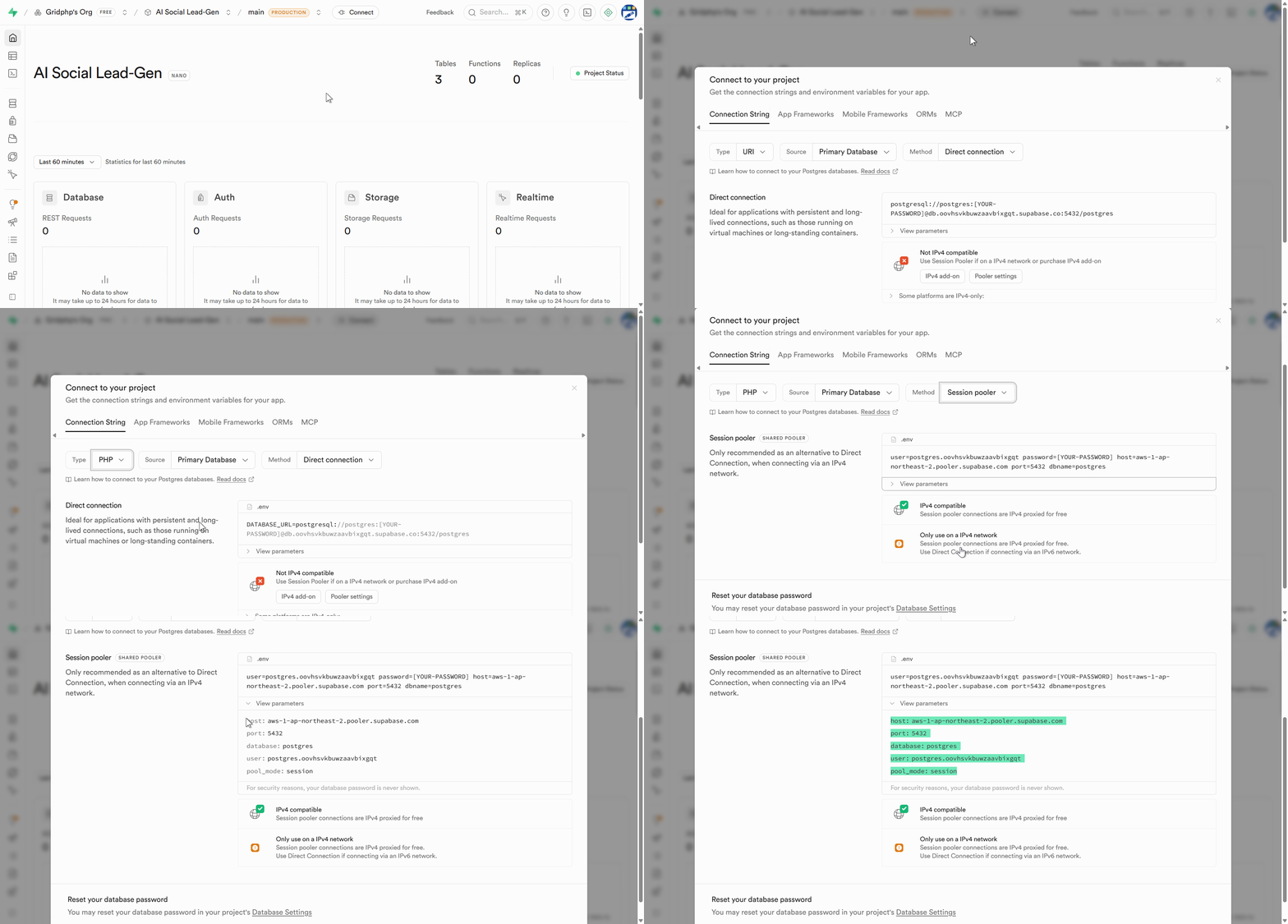
Step2) Get your Postgres connection details
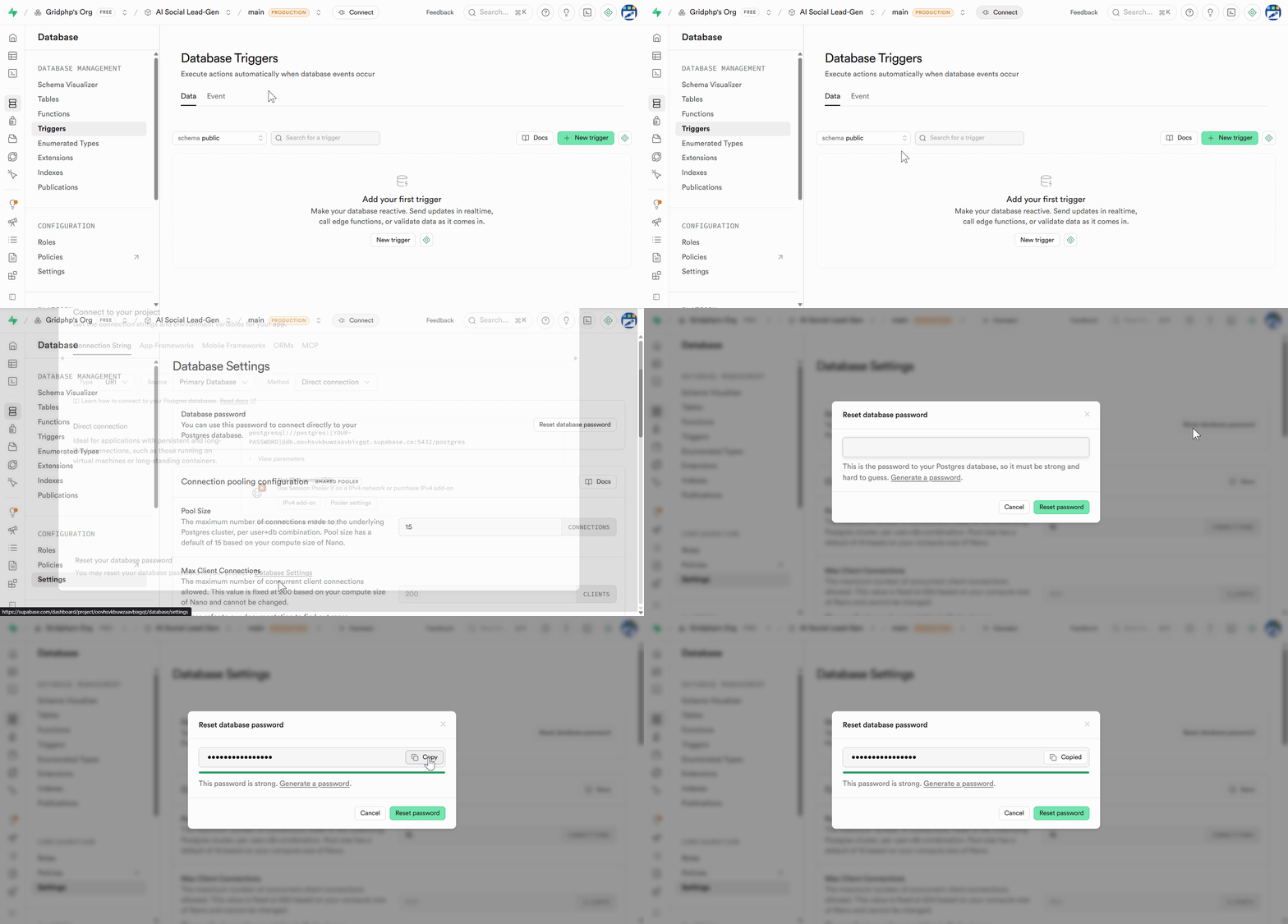
Step 3) Generate DB Password
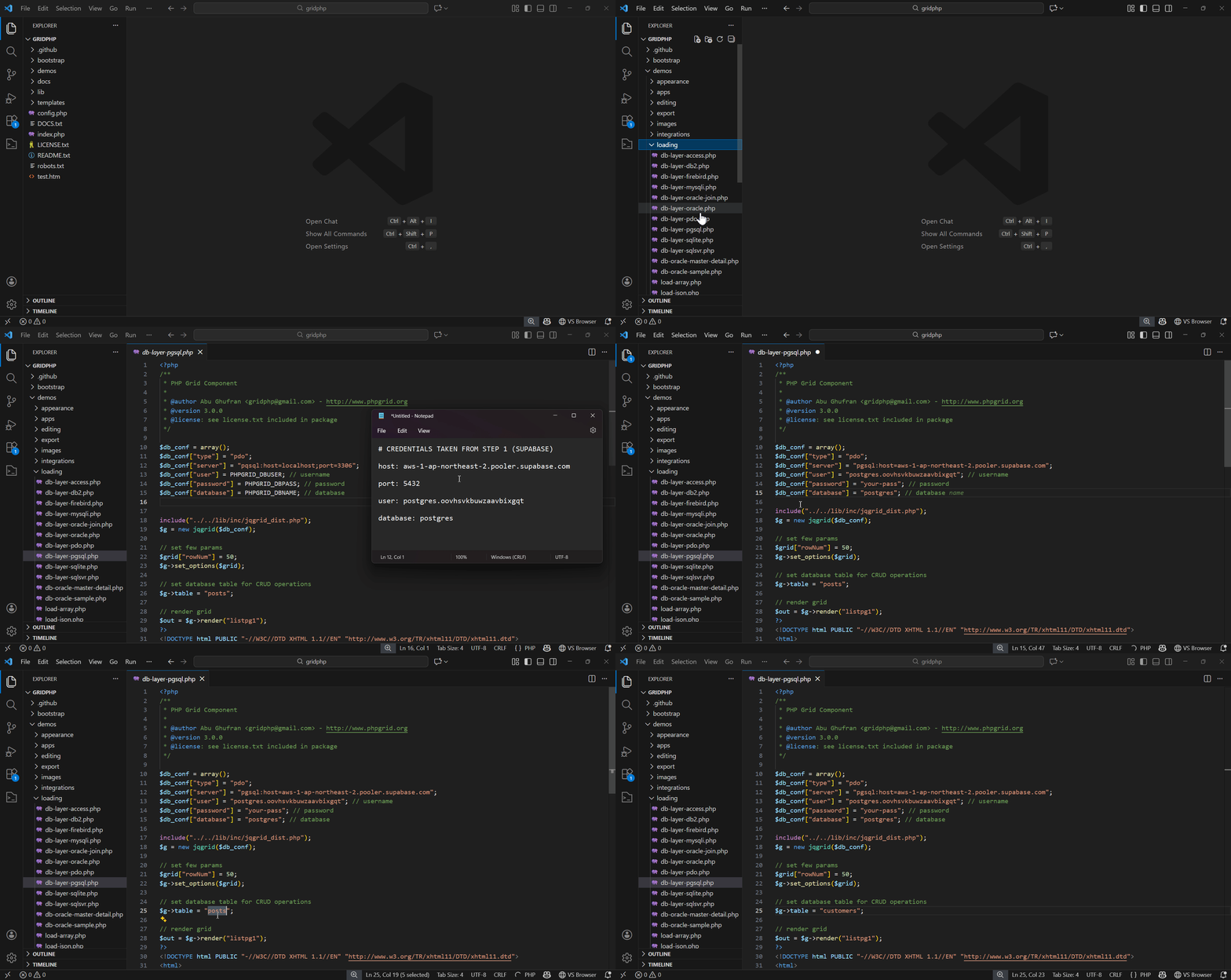
Step 4) Download & Extract the GridPHP package in webroot and plug Supabase credentials into GridPHP
Step 5) Run / Upload to your server
You’ll see results immediately.
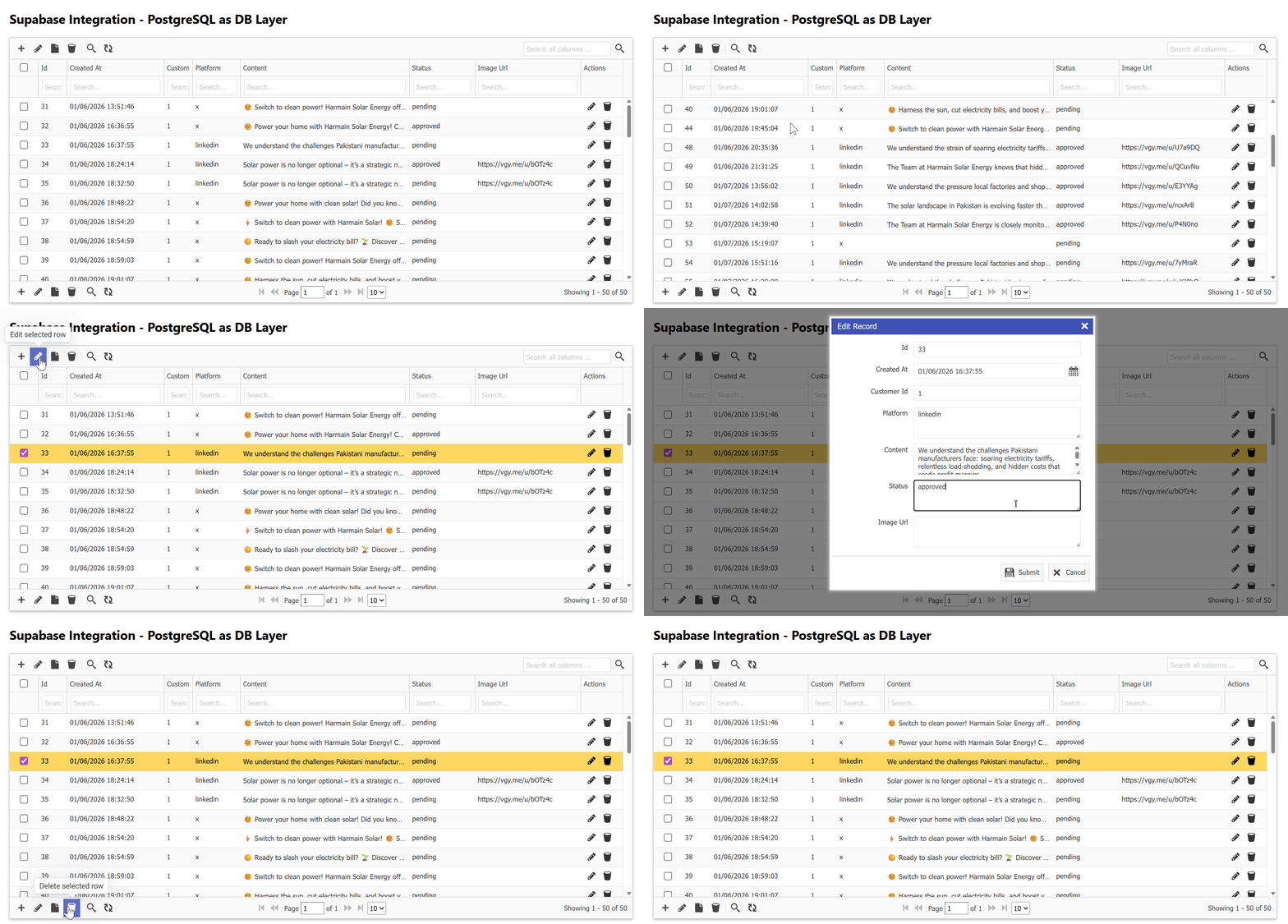
GridPHP offers a free version that PHP developers can use to connect Supabase databases and generate CRUD interfaces instantly.
Whats Next 🚀
If you’re a developer who wants:
- Supabase power
- PHP simplicity
- Faster delivery
🚀 Download the free version of GridPHP and connect it to Supabase today.
Start building features — not boilerplate.
GridPHP is designed for developers who ship, not just experiment.