
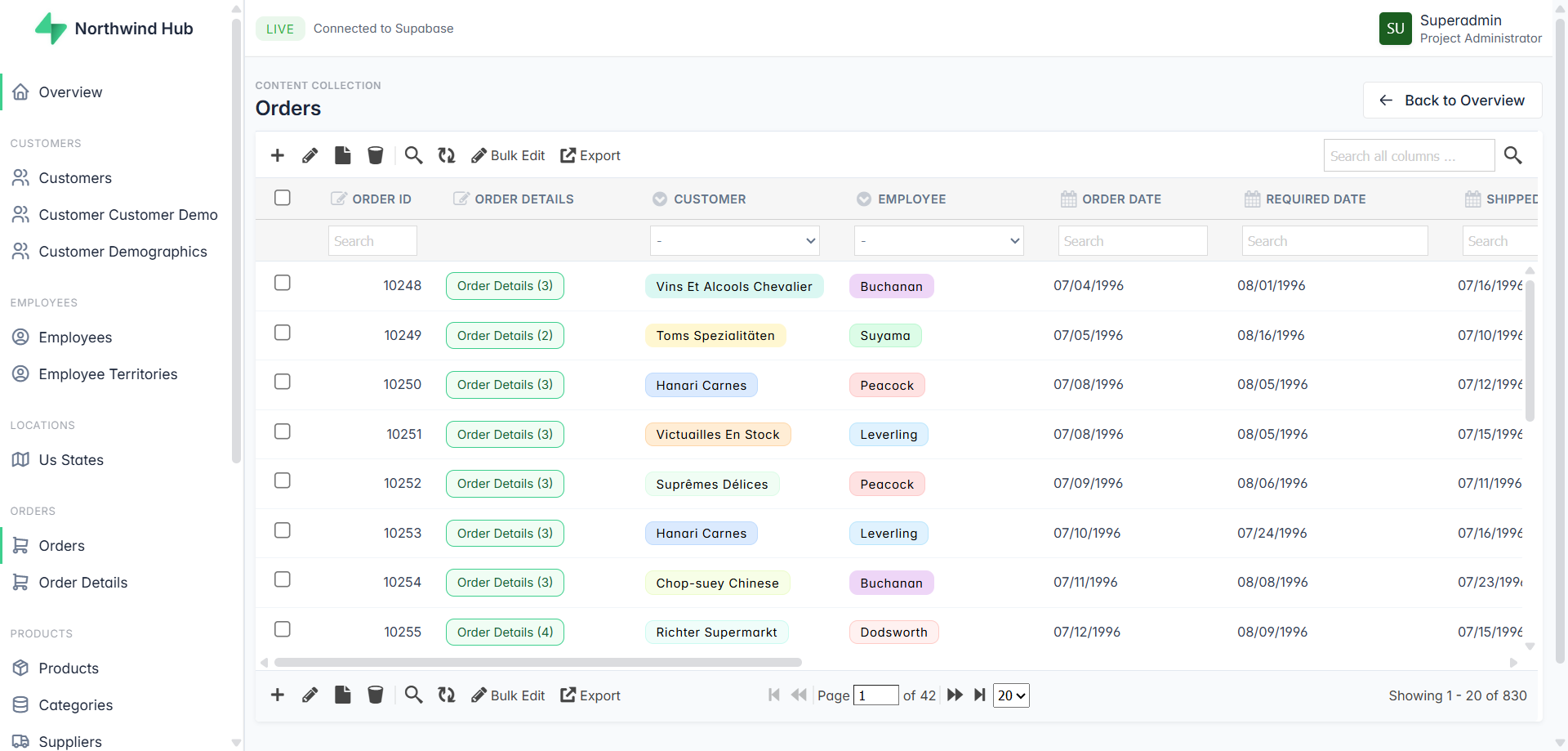
TL;DR
A direct comparison of every Supabase admin panel option — tools, pricing, and the one that uses AI to build itself from your schema.
- Most Supabase admin panel tools are either expensive SaaS, require developer setup, or show raw database tables with no intelligence.
- Admin Pilot connects via URI, uses AI to analyze your schema,
- Predicts workflows, groups tables by domain, and renders
- Relationships as human-readable labels automatically.
Free during beta. No signup required.
👉 Launch the live demo
Why Supabase Project Needs a Backoffice?
You built the product. Now your support team needs to look up a customer. Your ops manager wants to check an order. Your investor wants a dashboard. And none of them have access to Supabase Studio — nor should they.
This is the moment every Supabase founder hits. And most of them waste weeks solving it.
Admin Pilot is a Supabase admin panel builder that generates a complete backoffice from your PostgreSQL connection string — no coding, no configuration, no developer required.
The Problem With Supabase Studio
Supabase Studio is brilliant — for developers. Raw table editor, SQL console, migration tools. It’s a developer cockpit, not a business tool.
Hand it to a non-technical team member and one of two things happens: they break something, or they can’t figure it out and come back to you anyway.
You need a backoffice — a clean, role-controlled interface your whole team can use safely. The question is which one.
What You Actually Need
Before comparing tools, be clear on what you’re solving:
- Non-technical team access — support, ops, finance, management
- Safe data editing — not raw SQL, not Supabase Studio
- Role control — not everyone should see or edit everything
- Your data stays yours — credentials shouldn’t live on someone else’s server
Keep these in mind as you read.
Which Supabase Admin Panel Should You Use?
Here’s an honest look at every major option:
| Tool | Setup | Pricing | AI Analysis | Self-host | Modern UI |
|---|---|---|---|---|---|
| Motor Admin | Fast | Free / OSS | ❌ | ✅ | ❌ |
| Forest Admin | Medium | SaaS $$$ | ❌ | Partial | ❌ |
| Bricks.sh | Fast | SaaS | ❌ | ❌ | ✅ |
| Flashboard | Fast | SaaS | ❌ | ❌ | ✅ |
| Refine | Slow | Free / OSS | ✅ | ✅ | ✅ |
| UI Bakery | Medium | SaaS $$$ | ✅ | Paid add-on | ✅ |
| Supamode | Medium | $297 one-time | ❌ | ✅ | ✅ |
| Admin Pilot | Instant | Free beta | ✅ | ✅ | ✅ |
Motor Admin — Free and open-source. Gets the job done for basic CRUD. But the UI feels like 2018, and there’s no intelligence — it just mirrors your tables as-is, raw IDs and all.
Forest Admin — Enterprise-grade with powerful permissions and smart actions. But it’s complex to configure, the pricing scales aggressively, and setup takes real effort.
Bricks.sh — Clean, modern interface. Auto-generates from your schema. SaaS only though — your credentials live on their servers, and you’re on a monthly subscription.
Flashboard — Great CMS angle, especially for content-heavy apps. But limited in relational data handling and team configuration options.
Refine — AI-powered code generation that produces real React apps. Impressive, but it’s a developer tool. You still need someone to build and maintain the output.
UI Bakery — Feature-rich low-code platform with 45+ integrations. SOC2 certified. But the pricing is enterprise-level, and self-hosting costs extra.
Supamode — Self-hosted with a one-time license fee. Full source code ownership. But $297 upfront, setup takes technical knowledge, and there’s no AI layer.
What’s Missing From Every Supabase Admin Panel?
After going through all of these, the same gaps keep appearing:
They show you a database. They don’t understand your business.
Raw foreign key IDs instead of names. No sense of which tables matter and which are internal. No understanding of what your team actually does with the data. You still have to manually configure everything — columns, relationships, labels, workflows.
And most are either expensive SaaS subscriptions (your data leaves your server) or complex self-hosted tools that need a developer to set up.
There had to be a better way.
Admin Pilot — Paste a URI. Get a Backoffice.
That’s the entire setup. One connection string.
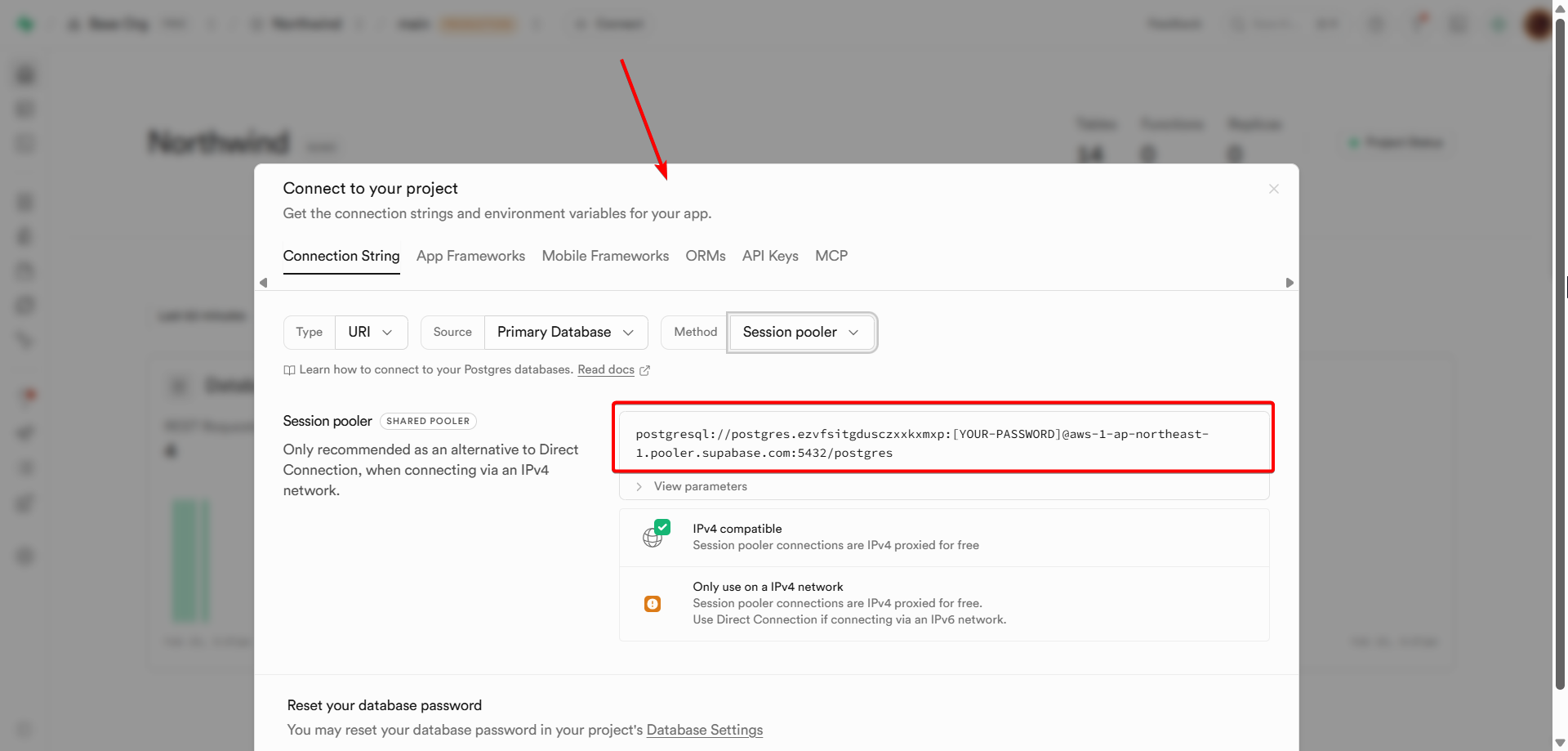
One click. No configuration files, no deployment pipeline, no developer required.
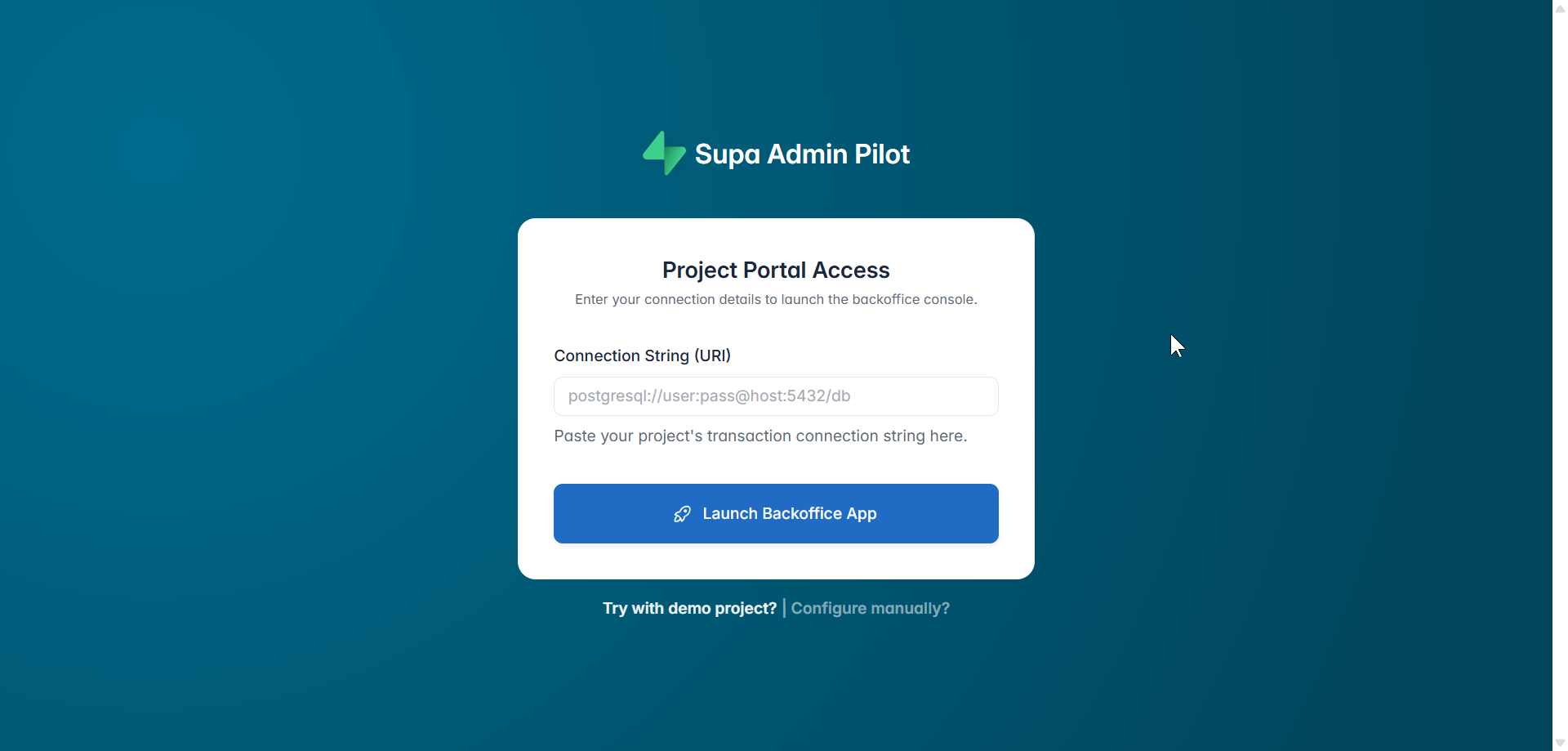
Here’s what happens in the background the moment you hit Launch Backoffice App:
↓  Discover Tables         — scans your full database structure
↓  Fetch Column Schema     — reads every column type, default, and constraint
↓  AI Schema Analysis      — detects relationships, selects the right UI widget per column
↓  Generate Project Name   — creates a branded name like "Commerce Console"
↓  Predict Workflows       — surfaces your team's most common actions automatically
↓  Save Configuration      — persists everything locally
↓  Your backoffice is live ✅
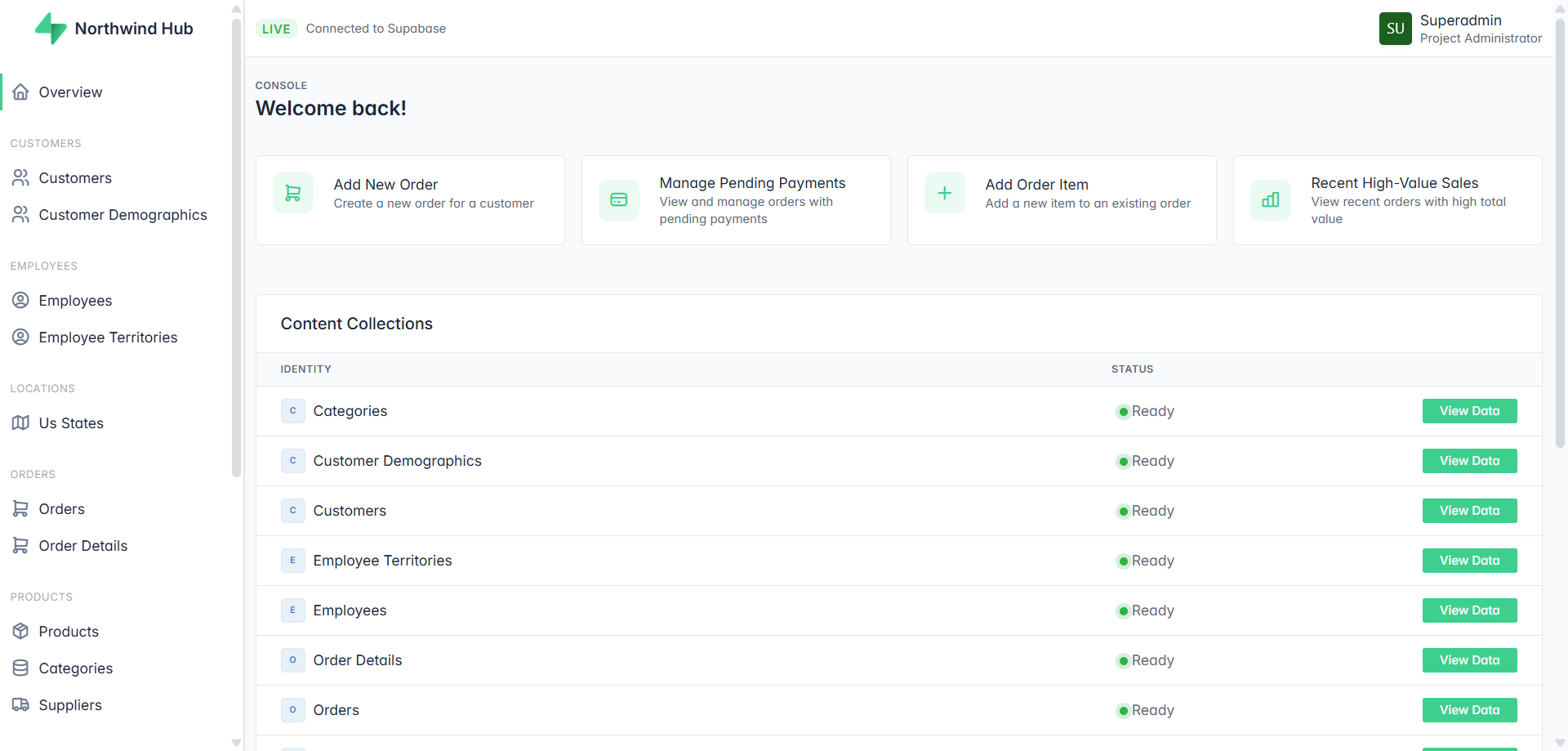
What you’re looking at above wasn’t configured. The AI read the database schema and built it — including the action cards at the top (“Add New Order”, “Manage Pending Payments”, “Add Product to Category”). Those are predicted workflows, not templates.
How Is AdminPilot Different From Other Supabase Admin Panels?
🤖 AI That Understands Relationships, Not Just Tables
Every other tool shows your data the way Postgres stores it. Admin Pilot shows it the way humans think about it.
When the AI detects a foreign key pointing to a parent table, it finds the human-readable label column — name, email, title — and renders that instead of a raw ID. When it detects child records, it renders a drill-down link that navigates directly to the related rows.
Your support team sees “Sarah Connor” — not customer_id: 4829. Your ops team sees “View 14 items →” — not a meaningless integer column.
Zero configuration. The AI figures out the direction of every relationship automatically.
⚡ Predicted Workflows — Your Dashboard, Already Built

The moment your backoffice launches, the dashboard already shows the most common actions for your business — based entirely on your schema. Not generic templates. Not drag-and-drop widgets you have to configure. Actions that match what your team actually does with your data.
🗂️ Smart Domain Grouping
Tables aren’t dumped in a flat sidebar list. The AI groups them by business domain automatically — CATALOG, SALES, HR, GEOGRAPHY, ORGANIZATION & SECURITY. Your team navigates by how they think about the business, not by how the database is organized.
👁️ Resource Visibility Control
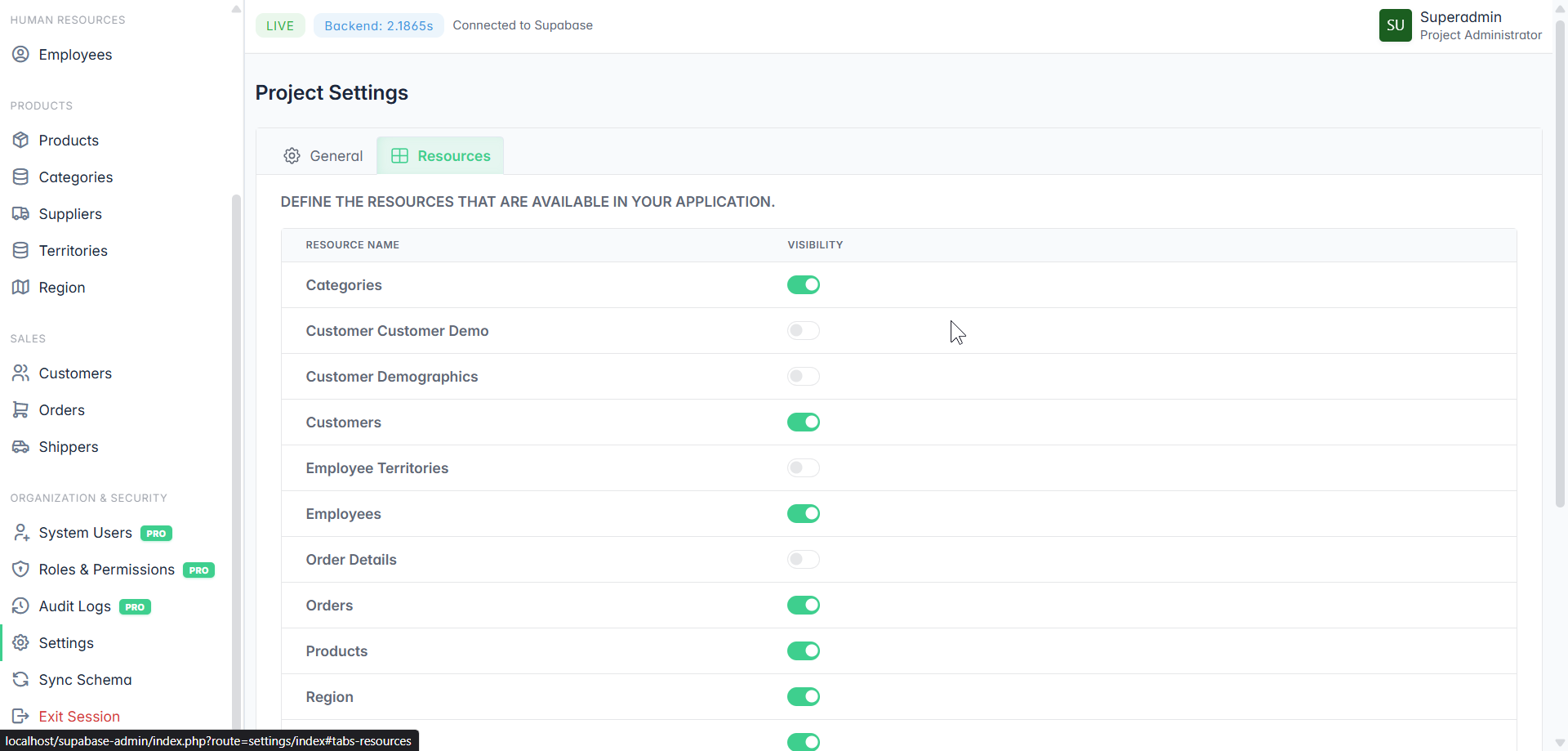
Not every table belongs in your Backoffice. Junction tables, internal lookup tables, migration logs — toggle them off. Your team only sees what they need.
🎨 Brand Control & White Labeling PRO
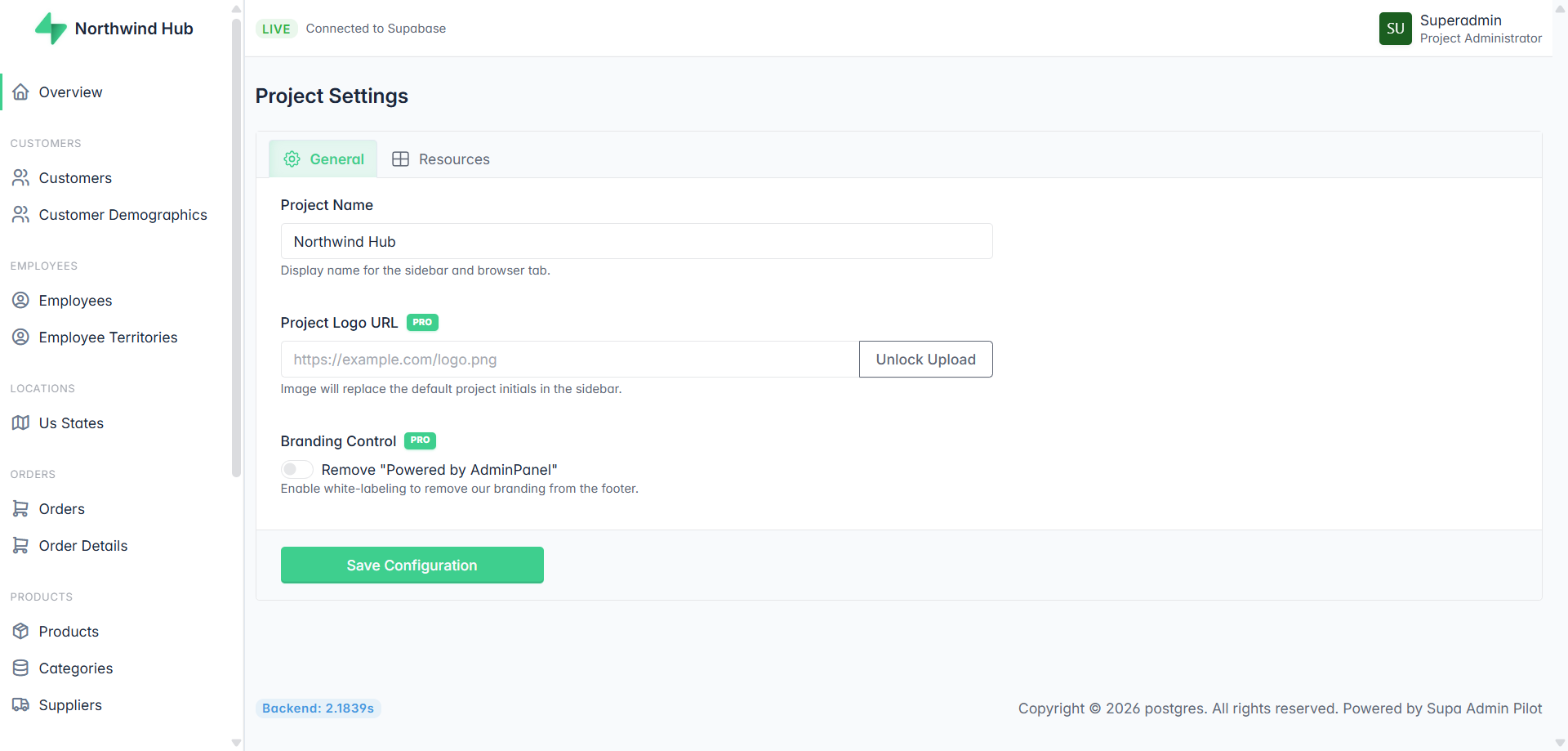
Custom project name. Your logo in the sidebar. Remove the “Powered by Admin Pilot” footer. Hand it to a client as your own product. Full white-label, no coding required.
🔐 Roles, Permissions & Audit Logs PRO
Control exactly who can see and do what. Support agents, managers, administrators — each with the right level of access. Every action logged with a full audit trail. Who changed what, and when.
☁️ SaaS or Self-Hosted — Your Choice
Run it on our servers or deploy it on your own infrastructure. Your database credentials never have to leave your environment if you don’t want them to.
Who Should Use It?
Business founders with a non-technical team — Give your support, ops, and management teams a proper tool. No Supabase access needed. No developer required every time someone needs to look something up.
Solo founders and indie hackers — Skip weeks of backoffice boilerplate. Launch your admin panel in the time it takes to copy a connection string. Focus on your product, not internal tooling.
Agencies — White-label it. Deliver a professional backoffice to every client as part of your service. Remove the branding, add theirs, done.
Try It Free
Admin Pilot is free during beta. No signup required. No credit card. Just paste your Supabase connection string and see what it builds.
👉 Launch the live demo
FAQ
Is my database password safe? Your connection string is used only to connect to your database. Nothing is stored on external servers unless you choose the cloud-hosted option. Self-hosted means your credentials never leave your own infrastructure.
Do I need to know SQL or write any code? No. The entire setup is a single connection string. Everything else — schema detection, UI generation, relationship mapping — is handled automatically.
Does it work with any Supabase project? Yes. Any Supabase project with a PostgreSQL connection string works out of the box.
What’s the difference between free and PRO? The core backoffice — tables, CRUD, relationships, workflows, domain grouping — is free. PRO unlocks System Users, Roles & Permissions, Audit Logs, and White Labeling.
Can I remove the “Powered by” branding? Yes — with PRO. One toggle in Project Settings removes the footer branding completely.
Can I self-host it? Yes. Admin Pilot supports both cloud-hosted and self-hosted deployment. Self-hosted means full control — your server, your data, your rules.
How do I create an admin panel for Supabase without coding? Paste your Supabase PostgreSQL connection string into SupaPanel and click Launch. The AI scans your database structure, detects table relationships, groups tables by business domain, predicts your team’s most common workflows, and generates a complete backoffice in seconds. No coding, no configuration files, no developer needed. Try it here.