
We’re thrilled to announce new game-changing features that make our GridPHP application templates even more powerful and user-friendly. These enhancements streamline workflows and provide enterprise-level editing capabilities right out of the box.
1. Related Detail Grid as Popup Box
Seamless Master-Detail Relationships
Managing related data has never been easier! Our new popup-based detail grid feature transforms how users interact with master-detail relationships in your applications.

How It Works
When viewing records in your main grid, users can now click to instantly view and manage related details in an elegant popup overlay. No more navigating away from your current view or losing context.
Perfect For:
- Order Management: View order items directly from the orders grid
- Customer Records: See contact details, transactions, or notes in one place
- Invoice Systems: Access line items without leaving the invoice list
- Project Management: View tasks and assignments from the projects overview
- Inventory Control: Check stock movements and transactions instantly
What This Means for Your Users
Your application users will appreciate the streamlined workflow. Whether they’re processing orders, managing customers, or tracking inventory, they can now work faster and more efficiently without the frustration of constant page navigation.
2. Retaining Filters – Global Filter Management
Set It Once, Filter Everywhere
Introducing a powerful new filtering paradigm that revolutionizes how users work with data across your application. With retaining filters, you can set global filters that persist across all grid operations, while still maintaining the ability to apply additional filters on top.

How It Works
Set a global filter once – such as “Show only active customers” or “Display current year records” – and that filter remains active across your entire session. All subsequent filtering, searching, and operations work within that globally filtered dataset.
Key Capabilities:
- Persistent Global Filters: Set base-level filters that apply across the entire grid
- Layered Filtering: Apply additional filters on top of global filters
- Context Preservation: Global filters remain active even when navigating between sections
- Easy Toggle: Turn global filters on/off without losing your settings
- Multi-Criteria Support: Combine multiple global filter conditions
Real-World Use Cases
Multi-Tenant Applications:
- Set global filter: Current client/company
- Users automatically see only their organization’s data
- Additional filters work within that scope for reports and analysis
Time-Based Data:
- Set global filter: “Current fiscal year” or “Last 30 days”
- All grid operations and reports stay within that time window
- Drill down further with status, category, or other criteria
Perfect For:
- Multi-user applications with role-based data access
- Applications with large datasets that need regular scoping
- SaaS platforms serving multiple clients/organizations
- Time-sensitive applications (current period vs historical data)
- Department-specific views in enterprise applications
- Territory-based sales and CRM systems
3. Advanced HTML Text Editor Integration
Rich Content Editing Made Easy
Our templates now include a powerful, feature-rich HTML text editor that brings word processor capabilities directly into your web applications. The integrated HTML editor provides everything your users need to create professional, formatted content.
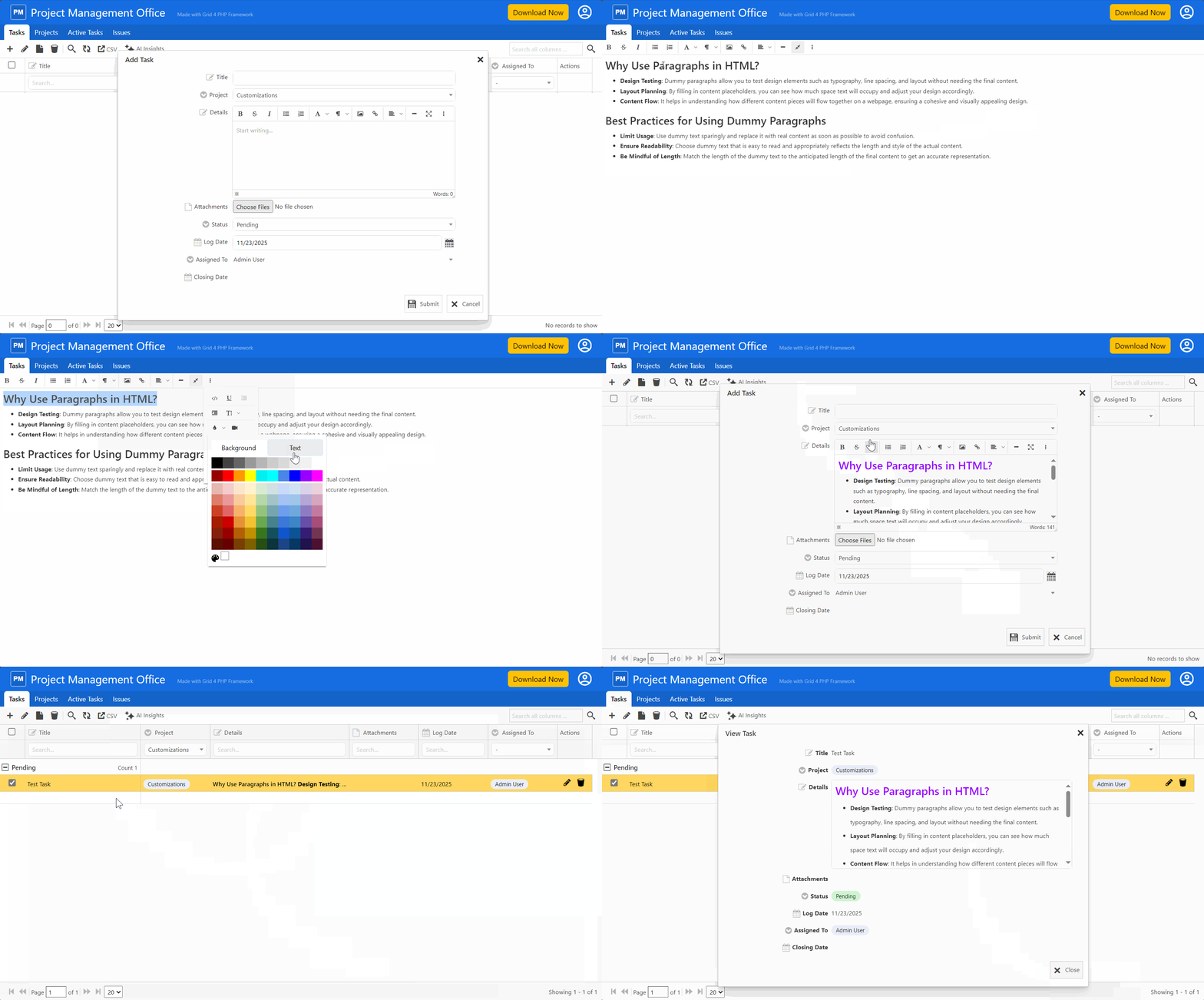
Formatting Options:
- Text Styling: Bold, italic, underline, strikethrough
- Headings: Multiple heading levels for proper document structure
- Font Controls: Change fonts, sizes, and colors
- Alignment: Left, center, right, and justify text
- Lists: Bulleted and numbered lists with nesting support
- Clean HTML Output: Generates semantic, standards-compliant HTML
- Paste from Word: Intelligently handles content from Microsoft Word
- Source Code View: Switch between visual and HTML editing modes
Ideal Applications
This feature is perfect for templates and applications that require rich content:
- Content Management: Blog posts, articles, and pages
- Email Composition: Professional email templates and messages
- Documentation: User manuals, help articles, and guides
- Notes and Comments: Detailed project notes and customer communications
- Product Descriptions: Rich, formatted product information
- Announcements: Company news and internal communications
Available Across All Templates
These features are now available in all our application templates:
- Event Planning
- Employee Directory
- Expense Tracker
- Donation Management
- Sales CRM
- Inventory Management
- Patient Management
Each template is pre-configured with these features, ready to use and easy to customize for your specific needs.
Building on Excellence
These new features complement the robust capabilities already included in every template:
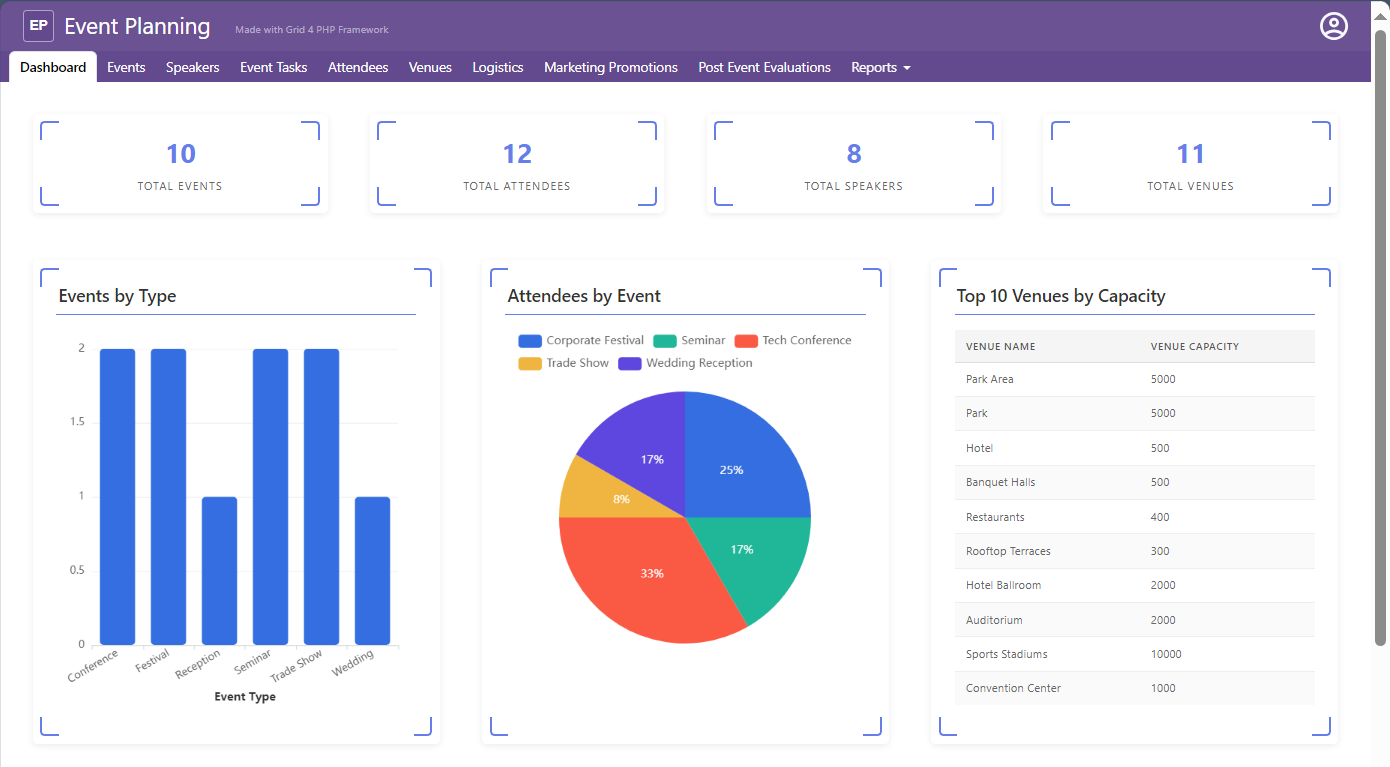
- Dashboard with KPI boxes for at-a-glance insights
- Multiple visualization options including bar charts, pie charts, and tables
- Powerful data grid with full CRUD operations
- Secure authentication and role-based authorization
- User management system built-in
- Mobile responsive design throughout
Get Started Today
Ready to experience these powerful new features? Visit our Template Center to explore all available templates and see these enhancements in action.
Why Upgrade or Get Started Now?
Faster Development: Build sophisticated applications in a fraction of the time Better User Experience: Your users will love the intuitive popup navigation and rich text editing Professional Quality: Enterprise features without enterprise development costs Future-Proof: Regular updates and enhancements keep your applications modern Excellent Support: Our team is ready to help you succeed
Next Actions
Active License Subscription customers can get free upgrade using this link.
Ready to elevate your applications? Explore our templates or contact our support team to learn how these features can transform your next project.
Start building better applications today with GridPHP templates!